Master AWS Developer Tools - AWS CodeBuild, CodeDeploy & CodePipeline

I am Bittu Sharma, a DevOps & AI Engineer with a keen interest in building intelligent, automated systems. My goal is to bridge the gap between software engineering and data science, ensuring scalable deployments and efficient model operations in production.! 𝗟𝗲𝘁'𝘀 𝗖𝗼𝗻𝗻𝗲𝗰𝘁 I would love the opportunity to connect and contribute. Feel free to DM me on LinkedIn itself or reach out to me at bittush9534@gmail.com. I look forward to connecting and networking with people in this exciting Tech World.
What are AWS Developer Tools?
AWS Developer Tools are a set of services designed to help developers and DevOps engineers securely store code, build applications, and deploy them automatically to AWS or on-premises environments. These tools support the entire software release cycle by enabling Continuous Integration (CI) and Continuous Delivery (CD) pipelines.
Key Services
AWS CodeCommit ( Deprecated July 2025)
A fully managed source control service for hosting Git repositories.
Secure, scalable, and integrates easily with AWS IAM for access control.
AWS CodeBuild
A fully managed build service that compiles source code, runs tests, and produces ready-to-deploy artifacts.
Automatically scales and supports pay-as-you-go pricing.
AWS CodeDeploy
Automates application deployments to Amazon EC2, AWS Fargate, Lambda, or on-premises servers.
Reduces downtime and supports rolling, blue/green, and canary deployments.
AWS CodePipeline
An orchestration service for automating CI/CD pipelines.
Integrates with CodeCommit, CodeBuild, CodeDeploy, and third-party tools like GitHub and Jenkins.
AWS CodeArtifact
A fully managed artifact repository for securely storing and sharing packages (npm, Maven, pip, NuGet).
Ensures dependencies are versioned and accessible.
AWS X-Ray (supporting tool)
Helps debug and analyze distributed applications.
Visualizes request flows and identifies bottlenecks.
Benefits:
Simplifies CI/CD pipeline automation.
Provides scalable, pay-per-use build and deployment services.
Integrates tightly with other AWS services (IAM, CloudWatch, S3, ECS, EKS, Lambda).
Reduces operational overhead with managed infrastructure.
Ensures faster and more reliable releases.
AWS APIs, CLI & SDKs
AWS provides multiple ways for developers, DevOps engineers, and system administrators to interact with its cloud services. These include APIs, the Command Line Interface (CLI), and Software Development Kits (SDKs). Each of these tools offers different levels of abstraction and flexibility for managing AWS resources.
1. AWS APIs
Low-level interfaces that allow direct communication with AWS services over HTTPS.
Access Method: Typically accessed via REST or Query-based API calls.
Use Cases:
Automating resource management.
Integrating AWS services into custom applications.
Fine-grained control over services where SDKs or CLI may not provide full coverage.
Examples with curl:
IAM API: Create a new user.
curl -X POST "https://iam.amazonaws.com/" \
  -H "Content-Type: application/x-www-form-urlencoded" \
  -H "X-Amz-Date: 20250913T120000Z" \
  -H "Authorization: AWS4-HMAC-SHA256 Credential=<ACCESS_KEY>/20250913/us-east-1/iam/aws4_request, SignedHeaders=content-type;host;x-amz-date, Signature=<SIGNATURE>" \
  -d "Action=CreateUser&UserName=NewUser&Version=2010-05-08"
S3 API: Upload an object to an S3 bucket.
curl -X PUT "https://mybucket.s3.amazonaws.com/myphoto.jpg" \
  -H "Content-Type: image/jpeg" \
  -H "x-amz-date: 20250913T120000Z" \
  -H "Authorization: AWS4-HMAC-SHA256 Credential=<ACCESS_KEY>/20250913/us-east-1/s3/aws4_request, SignedHeaders=content-type;host;x-amz-date, Signature=<SIGNATURE>" \
  --data-binary "@myphoto.jpg"
EC2 API: Start an instance.
curl -X POST "https://ec2.amazonaws.com/" \
  -H "Content-Type: application/x-www-form-urlencoded" \
  -H "X-Amz-Date: 20250913T120000Z" \
  -H "Authorization: AWS4-HMAC-SHA256 Credential=<ACCESS_KEY>/20250913/us-east-1/ec2/aws4_request, SignedHeaders=content-type;host;x-amz-date, Signature=<SIGNATURE>" \
  -d "Action=StartInstances&InstanceId=i-1234567890abcdef0&Version=2016-11-15"
⚠️ Note: All API requests require AWS Signature Version 4 signing for authentication. The
<ACCESS_KEY>and<SIGNATURE>values must be generated dynamically.
2. AWS Command Line Interface (CLI)
A unified tool that provides a command-line experience for managing AWS services.
Installation: Available for Windows, macOS, and Linux.
Use Cases:
Quick provisioning and management of AWS resources.
Automating workflows using shell scripts.
Accessing multiple services from a single tool.
Example Command:
aws s3 cp localfile.txt s3://mybucket/
3. AWS SDKs
Libraries provided by AWS to interact with its services programmatically using popular programming languages.
Supported Languages: Python (boto3), Java, JavaScript (Node.js), Go, .NET, Ruby, PHP, C++.
Use Cases:
Building applications that integrate AWS services.
Automating infrastructure tasks within code.
Handling authentication, retries, and error handling more easily compared to raw APIs.
Example in Python (boto3):
import boto3

s3 = boto3.client('s3')
s3.upload_file('localfile.txt', 'mybucket', 'remote_file.txt')
How APIs, CLI & SDKs are related?
APIs are the foundation: every AWS interaction goes through AWS APIs.
CLI is a wrapper around APIs: it translates commands into API calls.
SDKs are higher-level abstractions: they handle API calls within code, simplifying development.
In short:
APIs = Core building blocks.
CLI = User-friendly interface for quick operations.
SDKs = Developer-focused libraries for integrating AWS into applications.
Why They Matter for us:
Understanding APIs, CLI, and SDKs allows engineers to:
Automate cloud resource management at different abstraction levels.
Choose the right tool for the job (scripts → CLI, apps → SDKs, direct control → APIs).
Build scalable, efficient, and maintainable cloud-native solutions.
AWS CI/CD & Monitoring
AWS provides powerful tools and services that enable Continuous Integration (CI), Continuous Delivery (CD), and Monitoring. These practices help development and operations teams deliver software faster, with higher quality, and maintain visibility into application and infrastructure health.
1. Continuous Integration (CI)
The practice of frequently integrating code changes into a shared repository and automatically testing them.
AWS Services for CI:
AWS CodeBuild: Fully managed build service to compile source code, run tests, and produce deployable artifacts. It integrates easily with GitHub & BitBucket!
AWS CodeArtifact: Secure, scalable repository for storing build dependencies.
Benefits:
Early detection of bugs.
Automated build and test pipelines.
Faster feedback for developers.
2. Continuous Delivery (CD)
The practice of automatically preparing and deploying code changes to production or staging environments.
AWS Services for CD:
AWS CodePipeline: Orchestrates CI/CD workflows, connecting CodeCommit, CodeBuild, CodeDeploy, and third-party tools.
AWS CodeDeploy: Automates deployment to Amazon EC2, AWS Lambda, and on-premises servers.
Amazon Elastic Container Service (ECS) & EKS: Automate container deployments.
AWS Elastic Beanstalk: Simplified service for deploying web applications.
Benefits:
Faster release cycles.
Reduced human error with automation.
Consistent and repeatable deployments.
3. Monitoring & Observability
Definition: The practice of tracking, analyzing, and acting on metrics, logs, and traces to maintain application and infrastructure health.
AWS Services for Monitoring:
Amazon CloudWatch: Collects and visualizes logs, metrics, and events.
AWS X-Ray: Traces requests through distributed applications.
AWS CloudTrail: Logs AWS account activity for governance and auditing.
Amazon OpenSearch Service: Real-time search and log analytics.
Benefits:
Proactive issue detection.
Visibility into application performance and reliability.
Enhanced security and compliance.
AWS CodeBuild Deep Dive
AWS CodeBuild is a fully managed CI service that compiles source, runs tests, and produces artifacts without managing build servers. You bring a build container image (AWS-provided or custom), point CodeBuild at your source ( GitHub, Bitbucket, S3, or from CodePipeline), and define steps in a buildspec.yml.
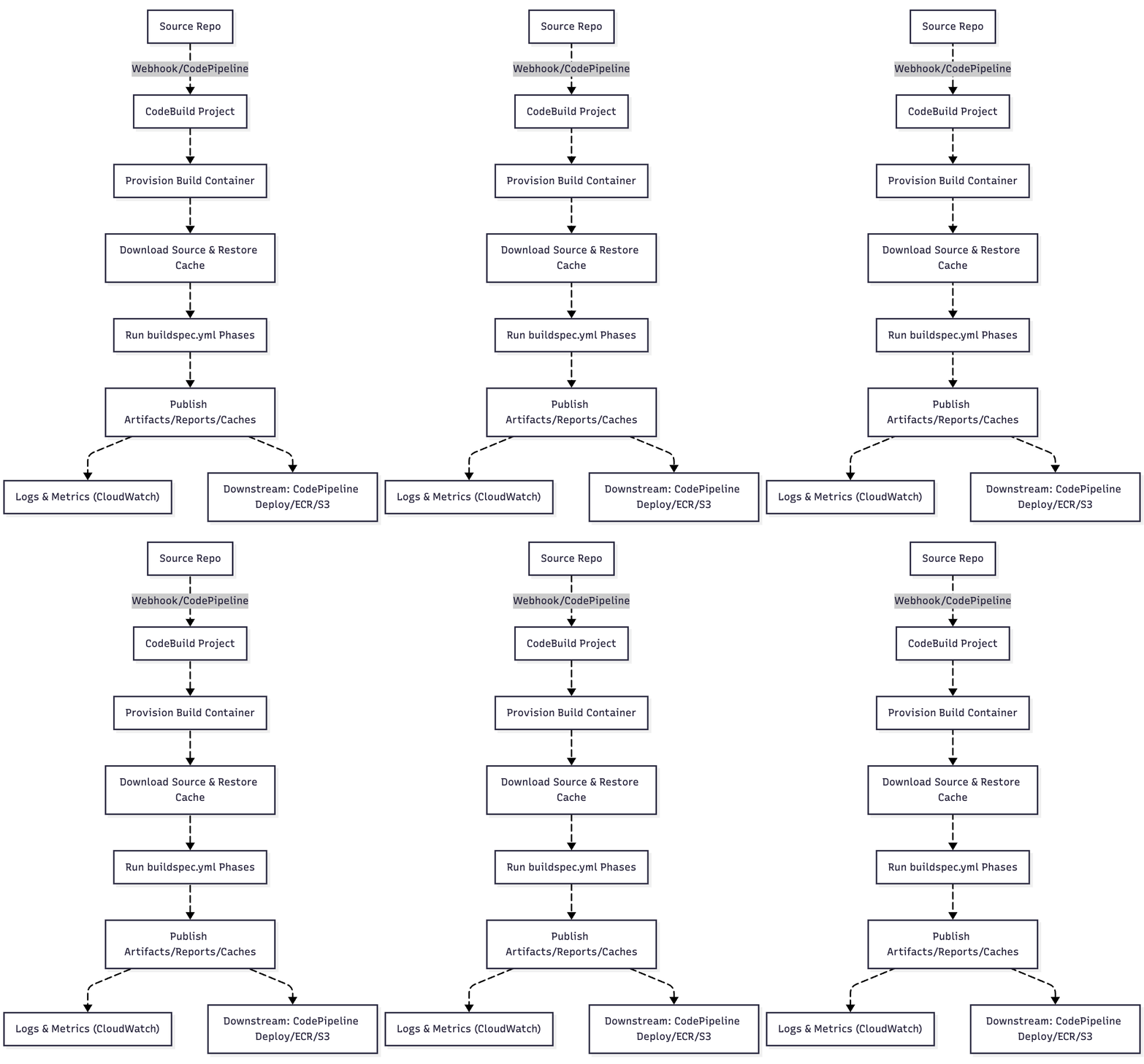
Why CodeBuild?
Serverless builds: No build fleet to patch or scale; pay per build minute.
Flexible runtimes: Use curated images or your own Docker image (from Docker Hub or ECR).
Deep AWS integration: First-class with CodePipeline, CloudWatch Logs/metrics, Secrets Manager/SSM, VPC, ECR, S3, KMS.
buildspec.yml
buildspec.yml tells CodeBuild what to run inside the build container. It lives at repo root by default (you can override per project).
Minimal Structure (v0.2)
version: 0.2

env:
  variables:
    APP_ENV: "staging"
  parameter-store:        # or 'secrets-manager:' for Secrets Manager
    DB_PASSWORD: "/myapp/staging/db_password"
  exported-variables:
    - IMAGE_TAG           # will be available to CodePipeline next actions

phases:
  install:
    runtime-versions:     # only on AWS-managed images
      nodejs: 18
      python: 3.11
    commands:
      - node -v && python --version
  pre_build:
    commands:
      - echo "Logging in to ECR (if building images)…"
  build:
    commands:
      - echo "Run tests/build here"
  post_build:
    commands:
      - echo "Package artifacts, push images, write metadata"
  finally:
    commands:
      - echo "Always runs (success or fail)"

artifacts:
  files:
    - dist/**/*
  base-directory: dist
  name: "build-$CODEBUILD_BUILD_NUMBER.zip"

cache:
  paths:
    - ~/.npm/**/*

reports:
  junit_reports:
    files:
      - reports/junit/*.xml
    file-format: JunitXml
Version: Use
version: 0.2unless you must support legacy (0.1).
Detailed Explanations:
1) env
variables: Plain env vars.
parameter-store / secrets-manager: Securely inject secrets. Keys map to SSM parameter names or Secrets Manager ARNs/names.
exported-variables: Make variables visible to the build environment outputs (e.g., for CodePipeline actions consuming CodeBuild outputs).
2) phases
Each phase has a commands list (bash on Linux, PowerShell on Windows images). If any command returns non-zero, the phase fails and subsequent phases are skipped. Use finally to guarantee cleanup/log upload.
install: Prepare toolchains, set up languages. On AWS images,
runtime-versionspins language versions.pre_build: Auth steps (e.g., ECR login), dependency caching checks, lint.
build: Compile, test, package, or build Docker images.
post_build: Publish artifacts, push images, write metadata files, echo JSON to files, etc.
finally: Always executes—ideal for diagnostics, archiving logs, or cleanup.
Tip: If you need “fail fast”, leave default behavior (non-zero exits fail the build). To continue on error for specific lines, append
|| trueto those lines.
3) artifacts
What to upload to S3 as the build output.
files: Glob patterns relative to repo root unless you set
base-directory.base-directory: Changes the root for
files.name: Filename templating supports CodeBuild env vars (e.g.,
$CODEBUILD_RESOLVED_SOURCE_VERSION).secondary-artifacts: Define multiple named artifacts for multi-package repos.
4) cache
Speed up builds by caching directories.
S3 cache: default with
paths.Local cache modes (project setting):
LOCAL_SOURCE_CACHE,LOCAL_DOCKER_LAYER_CACHE,LOCAL_CUSTOM_CACHE. For Docker builds, enable privileged mode and Docker layer cache for big wins.
5) reports
Publish test reports to CodeBuild’s “Reports”:
files: Glob(s) to report files.
file-format: Common options include
JunitXmlandCucumberJson.Multiple named groups allowed (e.g.,
unit_tests,integration_tests).
Common Environment Variables from CodeBuild
CODEBUILD_BUILD_ID,CODEBUILD_BUILD_NUMBERCODEBUILD_SRC_DIR(or_<source_identifier>for secondary sources)CODEBUILD_RESOLVED_SOURCE_VERSION(commit SHA)CODEBUILD_SOURCE_VERSION(branch/tag/PR ref)CODEBUILD_INITIATOR(who/what started the build)AWS_DEFAULT_REGIONCODEBUILD_BATCH_BUILD_IDENTIFIER(for batch builds)
Practical, Ready-to-Use buildspec.yml Examples
A) Node.js app with tests, JUnit reports, and artifact packaging
version: 0.2
env:
  variables:
    NODE_ENV: production
  exported-variables:
    - APP_VERSION
phases:
  install:
    runtime-versions:
      nodejs: 20
    commands:
      - npm ci
  pre_build:
    commands:
      - node -v
      - APP_VERSION=$(jq -r .version package.json); export APP_VERSION
  build:
    commands:
      - npm run test:ci            # produce JUnit XML to reports/junit/
      - npm run build              # produce dist/
  post_build:
    commands:
      - echo "Build completed for version ${APP_VERSION}"
artifacts:
  base-directory: dist
  files:
    - "**/*"
reports:
  unit_tests:
    files:
      - "reports/junit/*.xml"
    file-format: JunitXml
cache:
  paths:
    - ~/.npm/**/*
B) Docker image build & push to Amazon ECR (with Docker layer cache)
Project settings: enable Privileged build, add Local Docker Layer Cache.
version: 0.2
env:
  variables:
    IMAGE_REPO: "123456789012.dkr.ecr.ap-south-1.amazonaws.com/myapp"
    IMAGE_TAG:  "$CODEBUILD_RESOLVED_SOURCE_VERSION"
phases:
  pre_build:
    commands:
      - aws --version
      - aws ecr get-login-password --region $AWS_DEFAULT_REGION | docker login --username AWS --password-stdin $IMAGE_REPO
  build:
    commands:
      - docker build -t $IMAGE_REPO:$IMAGE_TAG .
      - docker tag  $IMAGE_REPO:$IMAGE_TAG $IMAGE_REPO:latest
  post_build:
    commands:
      - docker push $IMAGE_REPO:$IMAGE_TAG
      - docker push $IMAGE_REPO:latest
      - printf '{"image":"%s","tag":"%s"}' "$IMAGE_REPO" "$IMAGE_TAG" > image.json
artifacts:
  files:
    - image.json
C) Multi-package monorepo with secondary artifacts
version: 0.2
phases:
  install:
    runtime-versions:
      nodejs: 18
    commands:
      - npm ci -w packages/api
      - npm ci -w packages/web
  build:
    commands:
      - npm run build -w packages/api
      - npm run build -w packages/web
artifacts:
  secondary-artifacts:
    api_bundle:
      base-directory: packages/api/dist
      files:
        - "**/*"
      name: "api-$CODEBUILD_BUILD_NUMBER.zip"
    web_bundle:
      base-directory: packages/web/out
      files:
        - "**/*"
      name: "web-$CODEBUILD_BUILD_NUMBER.zip"
cache:
  paths:
    - ~/.npm/**/*
D) Python app with venv reuse and Cucumber JSON reports
version: 0.2
phases:
  install:
    runtime-versions:
      python: 3.11
    commands:
      - python -m venv .venv
      - . .venv/bin/activate
      - pip install -r requirements.txt
  build:
    commands:
      - pytest --junitxml=reports/junit/results.xml --cucumberjson=reports/cucumber/results.json
artifacts:
  files:
    - dist/**/*
reports:
  junit:
    files:
      - reports/junit/results.xml
    file-format: JunitXml
  cucumber:
    files:
      - reports/cucumber/results.json
    file-format: CucumberJson
cache:
  paths:
    - .venv/**/*
Common Integrations :
Custom images: Point the project at
aws/codebuild/standard:7.0or your own ECR image with preinstalled tools (Terraform, Docker CLI, etc.).VPC builds: Attach the project to a VPC/Subnets/SecurityGroups to reach private endpoints (RDS/ElastiCache/internal APIs). Ensure outbound to S3/ECR/STS via NAT or VPC endpoints.
IAM: Least-privilege role for the project; grant only required
ecr:*,s3:*,logs:*,ssm:GetParameter,secretsmanager:GetSecretValue, etc.Logs & metrics: CloudWatch Logs for stdout/stderr; CloudWatch metrics for duration, status, queued time.
CodePipeline: Add a “Build” stage with this project. Use
exported-variablesand artifact files (likeimage.json) for downstream actions.Local builds: Use the CodeBuild local agent (Docker) to reproduce builds on your workstation (great for debugging Docker privilege and cache behavior).
Batch builds / matrices: Useful for parallel variant builds (e.g., multi-runtime tests). Configure at project level; each child still honors the
buildspec.yml.
AWS CodeDeploy Deep Dive
AWS CodeDeploy is a fully managed deployment service that automates software deployments to a variety of compute services such as Amazon EC2, AWS Lambda, on‑premises servers, and Amazon ECS. It allows you to release new features quickly, avoid downtime, and handle the complexity of updating applications across a fleet of instances or containers.
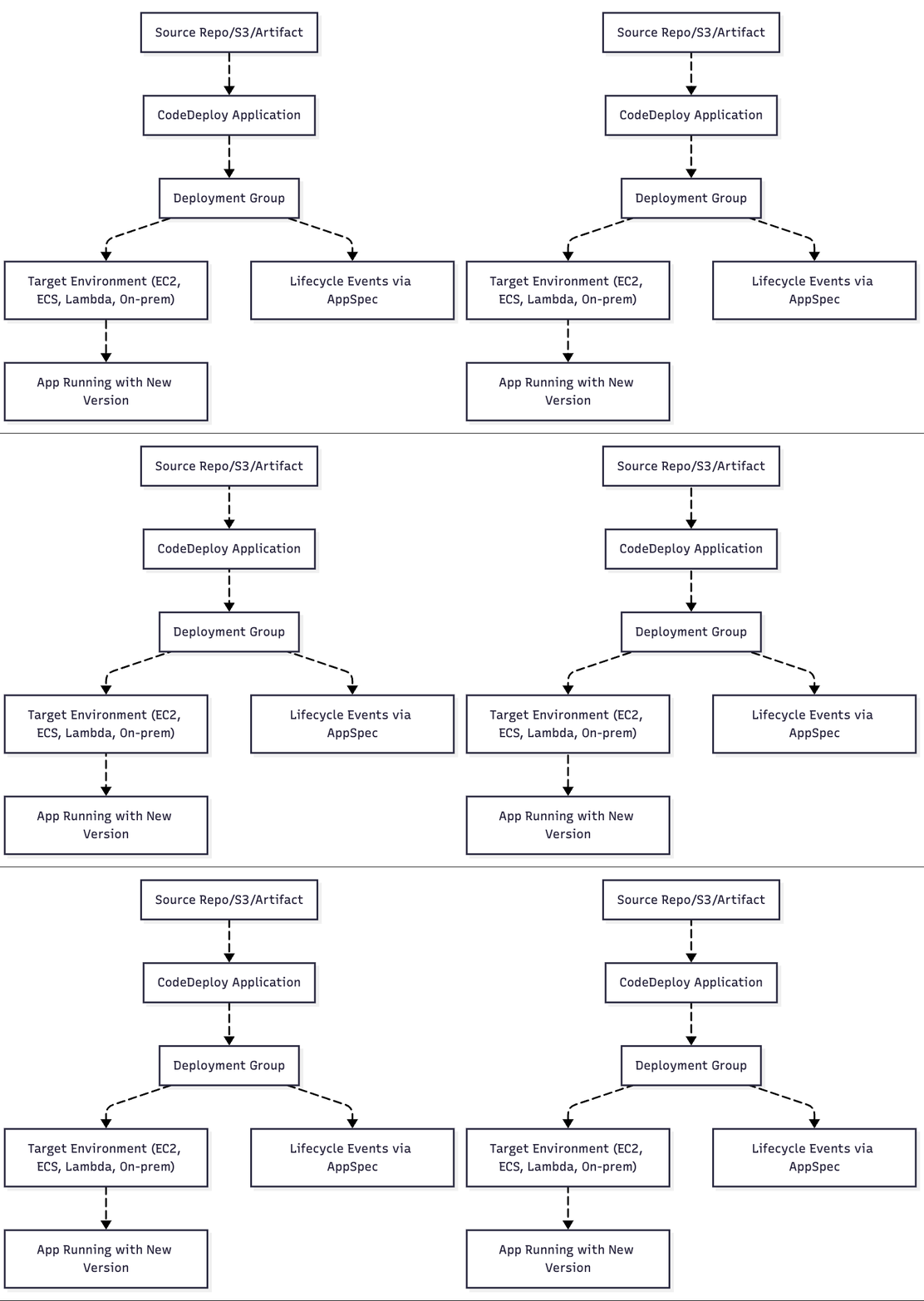
Why CodeDeploy?
Zero-downtime deployments: Rolling, blue/green, canary.
Flexibility: Deploy to EC2, ECS, Lambda, or even on-prem servers.
Automation: Coordinates deployment lifecycle hooks.
Resilience: Automatic rollback if a deployment fails.
Integration: Works with CodePipeline, GitHub, S3, Jenkins.
Core Concepts:
Application: A logical reference to your deployment setup (type: EC2/On‑Prem, Lambda, ECS).
Deployment Group: Defines where to deploy (tags/ASGs for EC2, services/tasks for ECS, or Lambda functions).
Revision/Artifact: The version of your code to deploy (from S3, GitHub, or CodePipeline).
AppSpec File: Deployment instructions that tell CodeDeploy how to install, validate, and clean up.
The AppSpec File
The AppSpec file is the heart of CodeDeploy. It defines what happens during the deployment lifecycle.
AppSpec for EC2/On-Prem (YAML)
version: 0.0
os: linux
files:
  - source: /
    destination: /var/www/html

hooks:
  BeforeInstall:
    - location: scripts/before_install.sh
      timeout: 300
      runas: root
  AfterInstall:
    - location: scripts/after_install.sh
      timeout: 300
      runas: root
  ApplicationStart:
    - location: scripts/start_server.sh
      timeout: 300
      runas: root
  ValidateService:
    - location: scripts/validate.sh
      timeout: 300
      runas: root
AppSpec for ECS
version: 0.0
Resources:
  - TargetService:
      Type: AWS::ECS::Service
      Properties:
        TaskDefinition: "<TASK_DEFINITION>"
        LoadBalancerInfo:
          ContainerName: "my-app"
          ContainerPort: 80
AppSpec for Lambda
version: 0.0
Resources:
  - myLambdaFunction:
      Type: AWS::Lambda::Function
      Properties:
        Name: "MyLambdaFunction"
        Alias: "live"
        CurrentVersion: "1"
        TargetVersion: "2"
Lifecycle Event Hooks (EC2/On-Prem)
BeforeInstall: Stop services, backup, validate environment.
AfterInstall: Set file permissions, install dependencies.
ApplicationStart: Start services/app.
ValidateService: Run tests, health checks.
You can also use optional hooks like
ApplicationStop,BeforeAllowTraffic,AfterAllowTraffic(for ECS/Lambda/Blue-Green).
Common Deployment Strategies
In-place (rolling): Update existing instances in place.
Blue/Green:
EC2/On-Prem: New ASG launched, then traffic shifted.
ECS: New task set created, then traffic shifted via ALB.
Lambda: Alias shifted gradually between versions.
Example Scripts for Lifecycle Hooks
scripts/before_install.sh
#!/bin/bash
echo "Stopping old app..."
systemctl stop myapp || true
scripts/after_install.sh
#!/bin/bash
echo "Installing dependencies..."
cd /var/www/html
npm install --production
scripts/start_server.sh
#!/bin/bash
echo "Starting app..."
systemctl start myapp
scripts/validate.sh
#!/bin/bash
echo "Validating app..."
curl -f http://localhost:3000/health || exit 1
Common Integrations:
CodePipeline: Add CodeDeploy as a deploy stage.
Alarms & Rollback: Use CloudWatch Alarms or automatic rollback policies.
Deployment Configs:
CodeDeployDefault.AllAtOnceCodeDeployDefault.HalfAtATimeCodeDeployDefault.OneAtATimeCustom configs with percentage/interval.
Traffic Shifting (Blue/Green): Linear, Canary, or All-at-Once.
IAM Roles:
Service role for CodeDeploy to manage resources.
Instance role for EC2/on-prem agents.
Logs: Check
/var/log/aws/codedeploy-agenton EC2.
AWS CodePipeline
AWS CodePipeline is a fully managed CI/CD orchestration service that automates the build, test, and deployment phases of your release process. It helps you deliver features and updates rapidly and reliably by modeling your software release workflow as a pipeline.
Why CodePipeline?
Automation: End-to-end automation from commit to deploy.
Integration: Connects with CodeCommit, GitHub, Bitbucket, CodeBuild, CodeDeploy, Lambda, ECS, and third-party tools like Jenkins.
Speed: Parallel and sequential actions ensure fast delivery.
Repeatability: Same process every time → consistency.
Rollback support: Combined with CodeDeploy, can rollback on failure.
Core Concepts
Pipeline: Top-level container that defines the workflow.
Stage: Logical unit inside a pipeline (e.g., Source, Build, Deploy).
Action: A task inside a stage (e.g., GitHub checkout, CodeBuild project, Lambda invocation).
Artifact: Files/data passed between actions (e.g., build output → deploy).
Transition: Control point between stages, can be disabled/enabled manually.
Pipeline Structure (JSON/YAML Definition)
Pipelines can be defined using AWS Console, CLI, SDKs, or CloudFormation/CDK.
Example Pipeline Definition (JSON)
{
  "pipeline": {
    "name": "MyAppPipeline",
    "roleArn": "arn:aws:iam::123456789012:role/CodePipelineServiceRole",
    "artifactStore": {
      "type": "S3",
      "location": "my-artifact-bucket"
    },
    "stages": [
      {
        "name": "Source",
        "actions": [
          {
            "name": "SourceAction",
            "actionTypeId": {
              "category": "Source",
              "owner": "AWS",
              "provider": "CodeCommit",
              "version": "1"
            },
            "outputArtifacts": [ { "name": "SourceOutput" } ],
            "configuration": {
              "RepositoryName": "my-repo",
              "BranchName": "main"
            }
          }
        ]
      },
      {
        "name": "Build",
        "actions": [
          {
            "name": "BuildAction",
            "actionTypeId": {
              "category": "Build",
              "owner": "AWS",
              "provider": "CodeBuild",
              "version": "1"
            },
            "inputArtifacts": [ { "name": "SourceOutput" } ],
            "outputArtifacts": [ { "name": "BuildOutput" } ],
            "configuration": {
              "ProjectName": "MyCodeBuildProject"
            }
          }
        ]
      },
      {
        "name": "Deploy",
        "actions": [
          {
            "name": "DeployAction",
            "actionTypeId": {
              "category": "Deploy",
              "owner": "AWS",
              "provider": "CodeDeploy",
              "version": "1"
            },
            "inputArtifacts": [ { "name": "BuildOutput" } ],
            "configuration": {
              "ApplicationName": "MyCodeDeployApp",
              "DeploymentGroupName": "MyDeploymentGroup"
            }
          }
        ]
      }
    ],
    "version": 1
  }
}
Stages in Detail:
1. Source Stage
Pulls code from repositories (CodeCommit, GitHub, Bitbucket, S3).
Produces an artifact (zip/tar) stored in the S3 artifact bucket.
2. Build Stage
Runs build/tests using CodeBuild or Jenkins.
Consumes Source artifact → produces Build artifact.
Uses
buildspec.ymlinside CodeBuild.
3. Test Stage (Optional)
Run integration tests, security scans, linting.
Can invoke Lambda, CodeBuild jobs, or third-party tools.
4. Deploy Stage
Deploy using:
CodeDeploy → EC2, ECS, Lambda.
CloudFormation → infrastructure changes.
ECS blue/green.
Lambda alias shifting.
Manual Approvals
Add an Approval action between stages.
Example: require manager approval before production deploy.
Supports SNS notifications for approvals.
Artifact Management
Artifact Store: S3 bucket defined at pipeline creation.
Each stage passes artifacts (zipped outputs) to the next stage.
Artifacts can be encrypted with KMS.
Common Integrations:
Cross-Account Pipelines: Share artifacts across AWS accounts.
Cross-Region Pipelines: Deploy to multiple AWS regions.
Custom Actions: Use Lambda or third-party integrations.
Retry/Timeout: Actions support retry on failure and timeouts.
EventBridge Triggers: React to pipeline state changes.
Security: Use least-privilege IAM roles for each action.
Example CI/CD Flow (Node.js app)
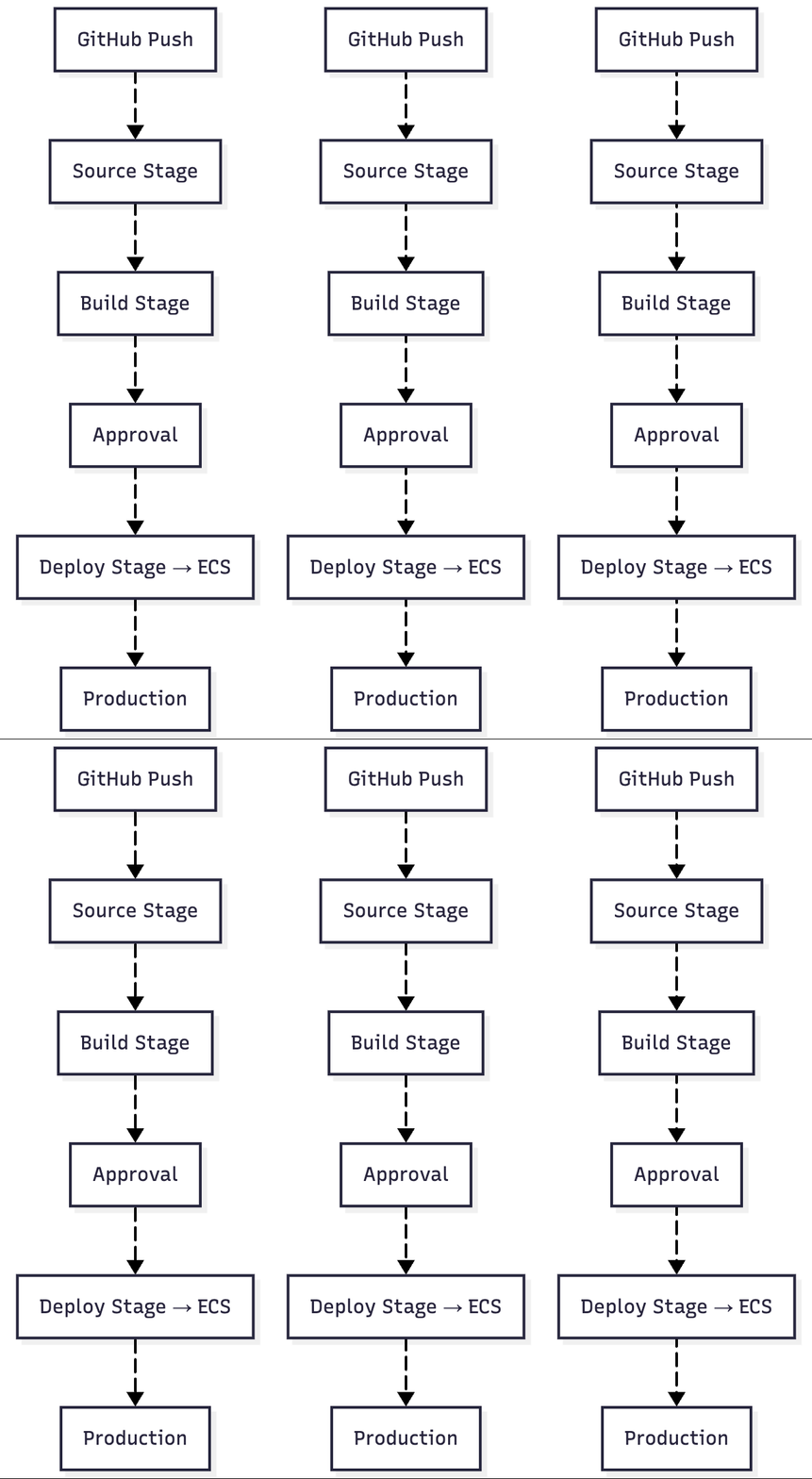
Source: GitHub (branch:
main).Build: CodeBuild (runs tests, produces dist/ as artifact).
Approval: Manual approval before prod.
Deploy: CodeDeploy (blue/green deploy to ECS service).
Challenges
Automate build with CodeBuild using a
buildspec.yml+ GitHub As SourceDeploy an application using CodeDeploy to EC2.
Create a full CI/CD pipeline with CodePipeline (GitHub → CodeBuild → CodeDeploy).
Integrate BitBucket as the source in CodePipeline instead of GitHub.
Implement a blue/green deployment with CodeDeploy + Auto Scaling.
Configure CloudWatch alarms to notify if pipeline or deployment fails.
Follow me on LinkedIn
Follow me on GitHub
Keep Learning……


