End-to-End Guide to DataRobot for MLOps Engineers

I am Bittu Sharma, a DevOps & AI Engineer with a keen interest in building intelligent, automated systems. My goal is to bridge the gap between software engineering and data science, ensuring scalable deployments and efficient model operations in production.! 𝗟𝗲𝘁'𝘀 𝗖𝗼𝗻𝗻𝗲𝗰𝘁 I would love the opportunity to connect and contribute. Feel free to DM me on LinkedIn itself or reach out to me at bittush9534@gmail.com. I look forward to connecting and networking with people in this exciting Tech World.
Introduction
As Machine Learning systems move from notebooks to production, MLOps becomes critical. Managing model training, deployment, monitoring, and retraining at scale is complex.
DataRobot is an enterprise AI platform that automates the entire ML lifecycle and provides strong MLOps capabilities such as deployment automation, monitoring, governance, and retraining.
In this blog, we’ll explore DataRobot from an MLOps Engineer’s perspective, with a step-by-step workflow from data to production.
What is DataRobot?
DataRobot is an end-to-end AI platform that provides:
Automated Machine Learning (AutoML)
Model versioning & governance
Scalable model deployment
Real-time & batch inference
Model monitoring & drift detection
CI/CD & API integrations
👉 Think of DataRobot as AutoML + MLOps + Governance combined.
Why MLOps Engineers Use DataRobot
| Challenge | How DataRobot Helps |
| Manual ML pipelines | Automated pipelines |
| Deployment complexity | One-click deployment |
| Model drift | Built-in drift detection |
| Compliance | Model governance & audit trails |
| Scaling inference | Kubernetes-backed deployments |
High-Level DataRobot MLOps Architecture
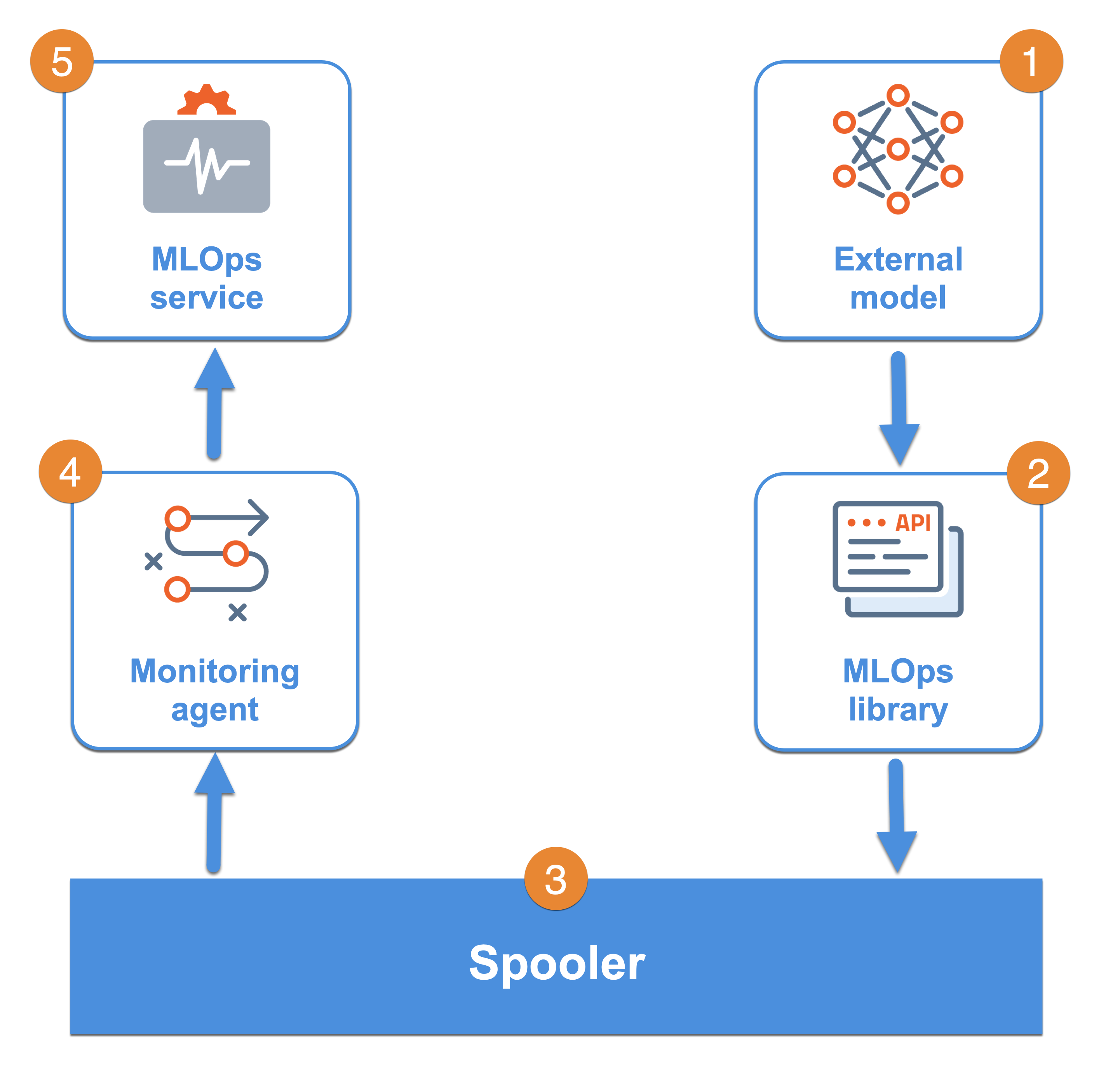

Typical Flow:
Data → AutoML → Model Selection
     → Deployment → Monitoring
     → Retraining → Redeployment
Step 1: Setting Up DataRobot Environment
Prerequisites
DataRobot account (Cloud or On-Prem)
Dataset (CSV / Parquet / Database)
API Key (for automation)
Install DataRobot Python SDK
pip install datarobot
Configure authentication:
import datarobot as dr

dr.Client(
    token="YOUR_API_TOKEN",
    endpoint="https://app.datarobot.com/api/v2"
)
✅ This is essential for CI/CD pipelines.
Step 2: Data Ingestion & Project Creation
Upload your dataset:
project = dr.Project.create(
    sourcedata="data.csv",
    project_name="Customer Churn Prediction"
)
Set target variable:
project.set_target(
    target="churn",
    mode=dr.AUTOPILOT_MODE.FULL_AUTO
)
💡 MLOps Insight:
All experiments are automatically versioned and reproducible.
Step 3: AutoML & Model Training
DataRobot automatically:
Tests multiple algorithms
Performs feature engineering
Tunes hyperparameters
Ranks models via Leaderboard
You get:
Accuracy
Precision/Recall
ROC-AUC
Explainability metrics
👉 No manual experimentation required.
Step 4: Model Selection & Governance
Select a model based on:
Business metric
Stability
Interpretability
Key governance features:
Model lineage
Training data snapshot
Feature importance
Compliance documentation
✅ Critical for regulated industries (Banking, Healthcare).
Step 5: Model Deployment (Core MLOps Step)
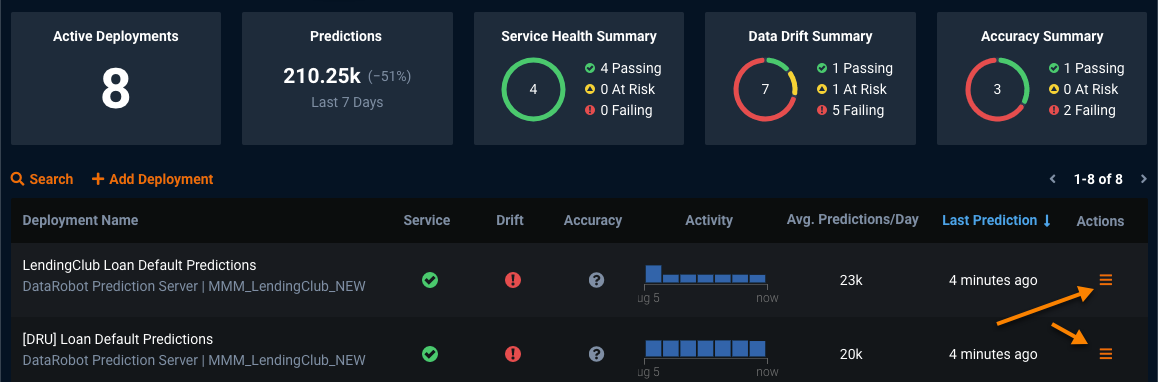
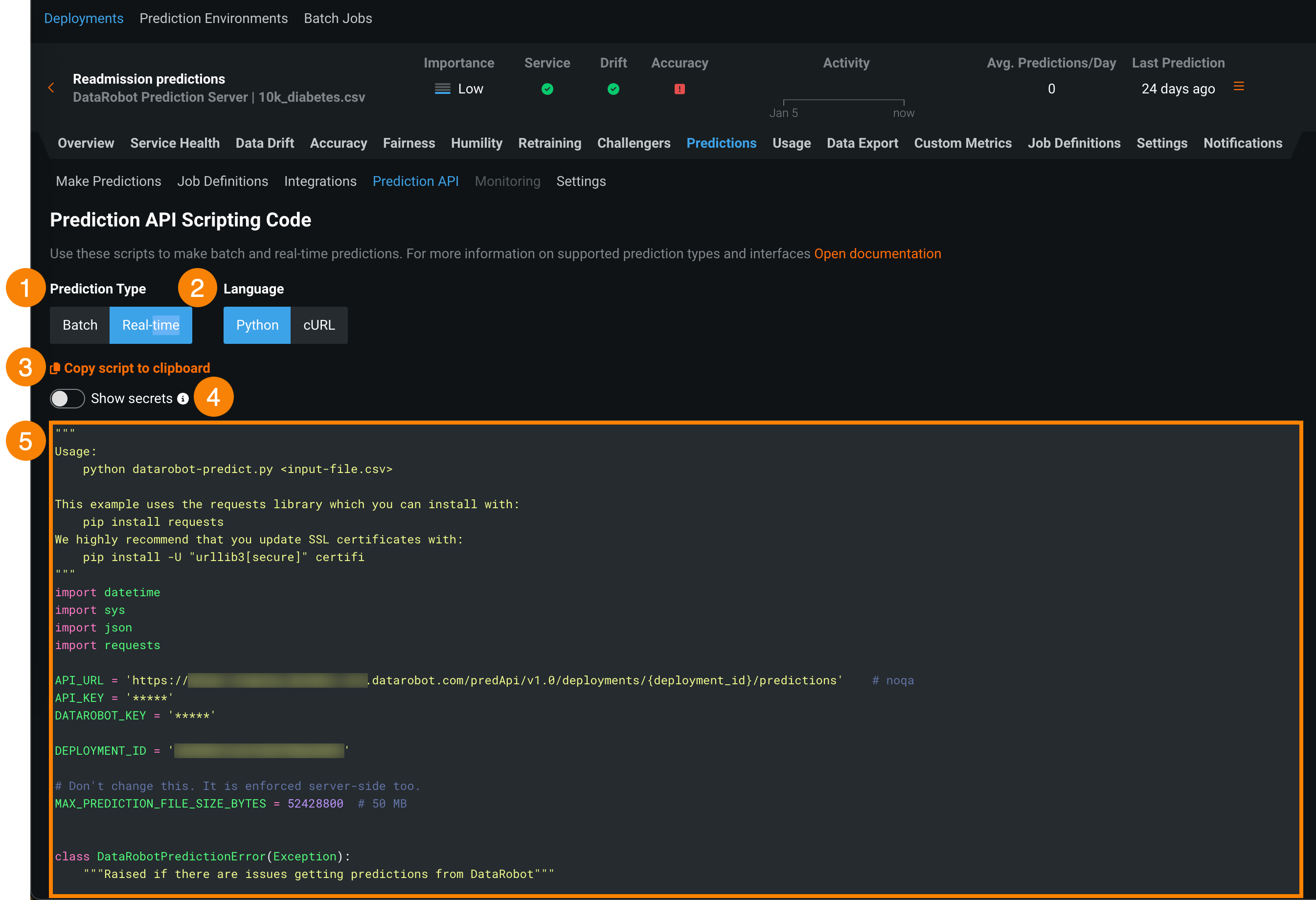
Deploy the model:
deployment = dr.Deployment.create_from_learning_model(
    model_id=model.id,
    label="churn-prod-model"
)
Deployment modes:
Real-time API
Batch predictions
Kubernetes-based scalable services
Step 6: Prediction & Inference
Real-Time Prediction Example
import requests

response = requests.post(
    deployment.prediction_endpoint,
    headers={"Authorization": "Bearer YOUR_API_KEY"},
    json={"data": [[45, 12000, 3]]}
)
print(response.json())
🔁 Easily integrated with:
Web apps
Microservices
ETL pipelines
Step 7: Monitoring & Drift Detection
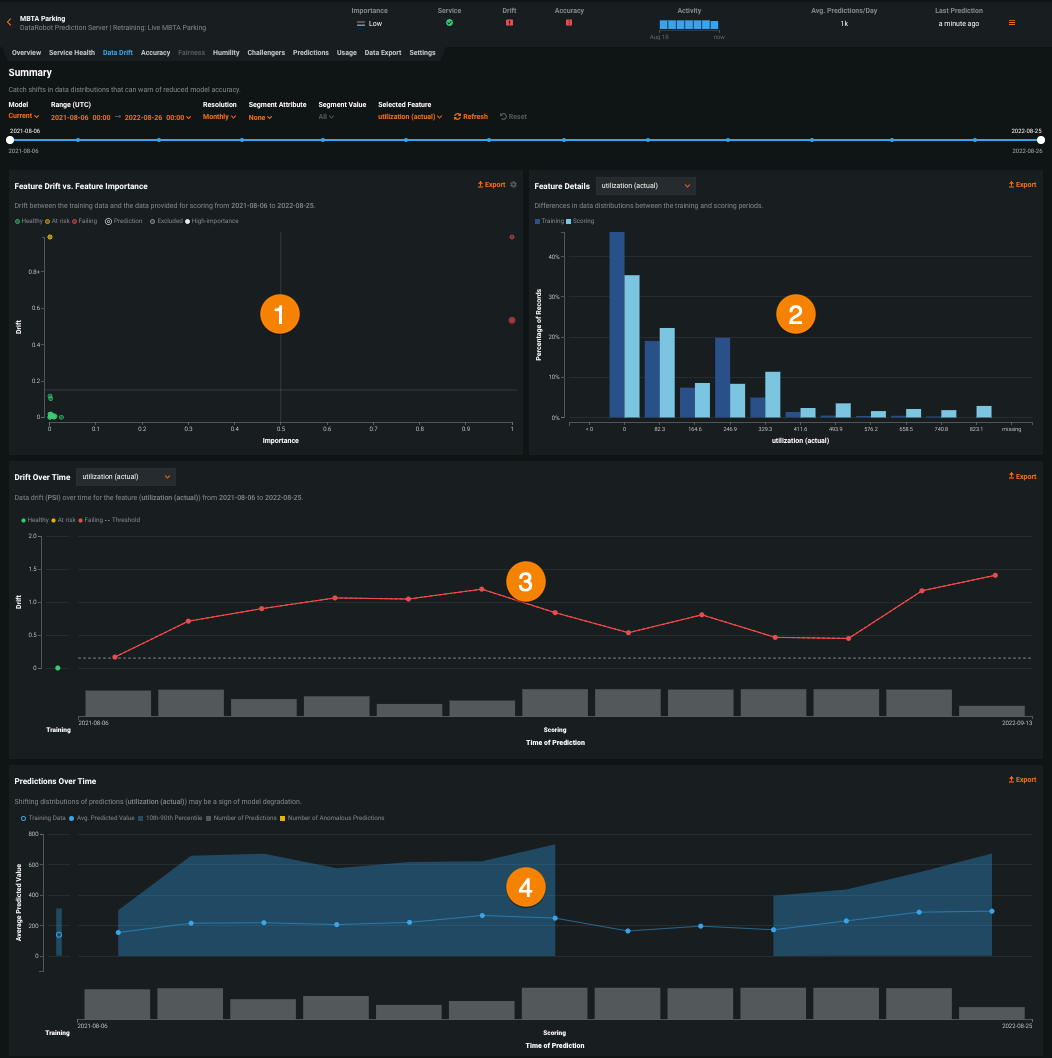
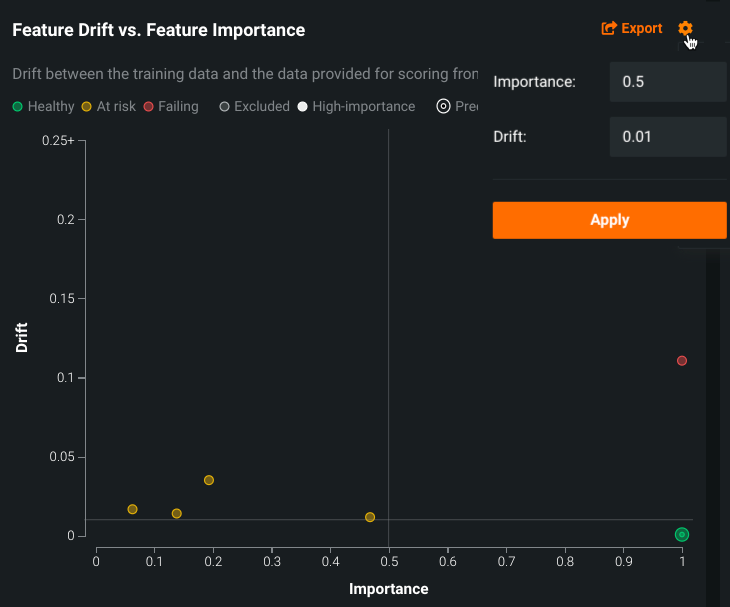
DataRobot monitors:
Data Drift
Prediction Drift
Accuracy decay
Latency & throughput
Alerts are triggered when:
Input distribution changes
Model performance drops
SLA thresholds are breached
Step 8: Automated Retraining Pipelines
You can configure:
Scheduled retraining
Drift-based retraining
CI/CD-triggered retraining
Workflow:
Drift Detected
   ↓
New Data Ingested
   ↓
AutoML Retraining
   ↓
Champion/Challenger Comparison
   ↓
Auto Redeployment
🔥 This is true production MLOps.
Step 9: CI/CD Integration (DevOps Friendly)
DataRobot integrates with:
GitHub / GitLab
Jenkins
Kubernetes
Terraform
REST APIs
Example:
CI Pipeline → Train Model → Validate → Deploy → Monitor
Perfect for DevOps → MLOps transition roles.
Step 10: Security & Access Control
Enterprise features include:
Role-based access control (RBAC)
Audit logs
Model approval workflows
Encryption at rest & in transit
🛡️ Essential for large organizations.
DataRobot vs Traditional MLOps Tools
| Feature | DataRobot | DIY MLOps |
| Setup time | Minutes | Weeks |
| AutoML | Built-in | Manual |
| Monitoring | Native | Custom |
| Governance | Strong | Limited |
| Cost | High | Lower |
When Should an MLOps Engineer Use DataRobot?
Use DataRobot if:
You work in enterprise environments
Compliance & governance matter
Speed to production is critical
You want less ops, more outcomes
Avoid if:
You prefer full open-source control
Budget is limited
Final Thoughts
For an MLOps Engineer, DataRobot removes much of the operational friction in ML systems while enforcing best practices in deployment, monitoring, and governance.
If your goal is to build scalable, production-ready ML systems fast, DataRobot is a powerful ally.


