🚀 Day 5 of 30-Day MLOps Challenge: Feature Engineering and Feature Stores

I am Bittu Sharma, a DevOps & AI Engineer with a keen interest in building intelligent, automated systems. My goal is to bridge the gap between software engineering and data science, ensuring scalable deployments and efficient model operations in production.! 𝗟𝗲𝘁'𝘀 𝗖𝗼𝗻𝗻𝗲𝗰𝘁 I would love the opportunity to connect and contribute. Feel free to DM me on LinkedIn itself or reach out to me at bittush9534@gmail.com. I look forward to connecting and networking with people in this exciting Tech World.
🧠 Learn here
What is Feature Engineering?
Feature Engineering is the process of transforming raw data into meaningful input features that improve the performance of machine learning models.
Key Concepts:
Features = input variables (columns) used by ML models to make predictions.
Goal = Create features that highlight the signal (patterns) and reduce the noise.
It involves:
Selecting relevant variables
Transforming variables (scaling, encoding, etc.)
Creating new features (e.g., time since last login, ratios, interactions)
Handling missing values, outliers, and categorical variables
In Simple words:
Feature Engineering is turning raw data into the most useful inputs so a machine-learning model can learn better.
Example:
| Raw Data | Engineered Feature |
| Timestamp | Hour of Day, Day of Week |
| User Click Log | Click Rate, Last Click Time |
| Address | Zip Code, Region |
| Text: "Great product!" | Sentiment Score |
Why It's Crucial for ML Success
Garbage In, Garbage Out: No matter how powerful the algorithm, poor features = poor results.
Boosts Model Accuracy: Well-engineered features help models better understand patterns and relationships in data.
Reduces Complexity: Simplifies the learning task by focusing on relevant inputs.
Domain Knowledge Integration: Injects human intuition and business logic into the model.
Improves Generalization: Helps models perform better on unseen data by reducing overfitting.
Practical Example:
Dataset: house_prices.csv
A simple dataset to predict house prices based on features such as location, size, number of bedrooms, and year built.
id,location,size_sqft,bedrooms,built_year,price
1,Bangalore,1200,2,2005,70
2,Delhi,1800,3,2010,90
3,Mumbai,800,1,2000,50
4,Chennai,1500,3,2015,85
Objective
Prepare the dataset for machine learning by engineering meaningful features that improve model performance.
Feature Engineering Steps
| Step | Feature | Transformation | Purpose |
| 1 | built_year | house_age = current_year - built_year | Easier for ML models to understand |
| 2 | location | One-hot encoding | Convert categorical to numerical values |
| 3 | size_sqft | Standard scaling | Normalize large ranges |
| 4 | price | Log(price) (optional) | Reduce skewness |
| 5 | size_per_room | size_sqft / bedrooms | Derived informative feature |
Final Engineered Columns Example
id,house_age,size_per_room,location_Bangalore,location_Delhi,location_Mumbai,location_Chennai,price
1,19,600,1,0,0,0,70
2,14,600,0,1,0,0,90
3,24,800,0,0,1,0,50
4,9,500,0,0,0,1,85
Example Python Script for the same:
import pandas as pd
from sklearn.preprocessing import OneHotEncoder, StandardScaler
import numpy as np

# Step 1: Load CSV
df = pd.read_csv('house_prices.csv')

# Step 2: Create house_age from built_year
current_year = 2025
df['house_age'] = current_year - df['built_year']

# Step 3: Create size_per_room feature
df['size_per_room'] = df['size_sqft'] / df['bedrooms']

# Step 4: One-hot encode 'location'
location_encoded = pd.get_dummies(df['location'], prefix='location')
df = pd.concat([df, location_encoded], axis=1)

# Step 5: Drop unused columns
df = df.drop(['location', 'built_year'], axis=1)

# Step 6: Normalize numerical features
scaler = StandardScaler()
df[['size_sqft', 'house_age', 'size_per_room']] = scaler.fit_transform(df[['size_sqft', 'house_age', 'size_per_room']])


# Save to CSV
output_path = "house_prices_engineered.csv"
df.to_csv(output_path, index=False)

# Final Output
print("\U0001F9FE Final Feature Engineered DataFrame:")
print(df)
Output
A cleaned and transformed dataset ready for feeding into machine learning models like Linear Regression, XGBoost, Random Forests, etc.
Types of Features commonly used in machine learning
| Feature Type | Description | Examples | Common Preprocessing |
| Numerical | Quantitative values that represent a measurable quantity | Age, Salary, Temperature | Normalization, Standardization, Binning |
| Categorical | Qualitative values representing categories or groups | Gender, Country, Product Category | One-Hot Encoding, Label Encoding, Target Encoding |
| Ordinal | Categorical data with an inherent order | Education Level (High School < Bachelors < Masters) | Ordinal Encoding, Mapping to integers |
| Binary | Special case of categorical with two possible values | Yes/No, Male/Female | Mapping to 0/1 |
| Datetime | Dates and times, often requiring transformation into multiple features | Date of Purchase, Timestamp | Extract year, month, day, weekday, hour; Time delta |
| Text | Unstructured string data | Product Reviews, Tweets | Tokenization, TF-IDF, Word Embeddings, BERT encoding |
| Boolean | True/False values representing flags or conditions | Is_Active, Is_Returned | Convert to 0/1 |
| Geospatial | Latitude/longitude, location coordinates | GPS data, City Coordinates | Distance calculations, Clustering, GeoHash encoding |
| Image/Audio | Complex unstructured data types captured visually or acoustically | Photo, Spectrogram | Feature extraction via CNNs/RNNs, embeddings |
Data Examples:
1. Tabular Data (Business / Transactions)
| Raw Column | Engineered Feature(s) |
| Transaction_Time | Hour of Day, Day of Week, IsWeekend |
| Amount | Log(Amount), Z-Score |
| Customer_ID | Number of Transactions per Customer, Days Since Last Purchase |
| Product_ID | Product Category, Price Tier |
| Country | Region, IsDomestic |
2. Date/Time Data
| Raw Timestamp | Engineered Features |
| 2024-05-18 21:45 | Hour, Weekday, IsWeekend, Month, TimeOfDay (Morning/Night) |
3. Web/App User Behavior
| Raw Data | Engineered Feature |
| Page visit logs | Avg Time Per Page, Bounce Rate, Click-through Rate |
| Session timestamps | Session Duration, Session Count per Day |
| User events | Days Since Last Login, Active Days in Last 30 Days |
4. E-commerce Data
| Raw Field | Engineered Feature |
| Product_Description | TF-IDF, Sentiment Score, Top Keywords |
| Order_Date | Holiday Indicator, Season |
| Product_Category | One-hot encoded categories |
| Customer Reviews (Text) | Polarity, Subjectivity, Review Length, Emoji Count |
5. Text Data (NLP)
| Raw Text | Engineered Feature |
| "I love this product!" | Sentiment = 0.9, Length = 4 words |
| Review paragraph | TF-IDF, Bag-of-Words, Word Embeddings |
| User typed search query | Query Length, HasProductName?, Spelling Errors |
6. Healthcare / Time Series
| Raw Signal / Column | Engineered Feature |
| Heart rate readings | Avg Heart Rate, Max Spike, Rate of Change |
| Blood sugar measurements | Moving Average, Time to Next Spike, Threshold Indicator |
| Patient age | Age Group (bucketed), IsSenior |
7. Image Data
| Raw Feature | Engineered Feature |
| Image Pixels | Edge Detection, Color Histogram, Shape Count |
| Image Metadata | Brightness, Contrast, Aspect Ratio |
8. IoT / Sensor Data
| Raw Input | Feature Example |
| Accelerometer readings | Avg Acceleration, Activity Type (walk/run/idle) |
| Temperature log | Rolling Mean, Outlier Flag, Time Since Peak |
9. Geospatial Data
| Raw Column | Feature Example |
| Latitude, Longitude | Distance to Nearest Store, Clustered Region |
| GPS logs | Total Distance Traveled, Average Speed |
Common Feature Engineering Transformations
| Transformation | Description | Examples |
| Encoding | Convert categorical data to numerical format. | OneHotEncoding, LabelEncoding, Target Encoding |
| Scaling | Normalize features to a standard range. | StandardScaler, MinMaxScaler, RobustScaler |
| Binning | Convert continuous values into discrete bins or intervals. | Age → [0–18, 19–35, 36–60, 60+] |
| Datetime Features | Extract relevant info from datetime columns. | year, month, day, weekday, is_weekend, hour, season |
| Text Tokenization (NLP) | Break text into tokens or word vectors. | TF-IDF, Bag of Words, Word2Vec, BERT Tokenizer |
| Log Transformation | Reduce skewness in data distribution. | log(x + 1) on price or income features |
| Interaction Features | Create combined features from existing ones. | price_per_sqft = price / area |
| Missing Value Imputation | Fill missing values using mean, median, or models. | age.fillna(median), KNNImputer |
| Polynomial Features | Generate higher-order combinations to capture non-linearity. | x², x*y, x³ |
| Discretization/Quantiles | Bin based on quantile ranges. | qcut() into quartiles or deciles |
Challenges in feature consistency across training & inference
Ensuring feature consistency between training and inference is a common challenge in MLOps and feature engineering pipelines. Inconsistencies can lead to degraded model performance, skewed predictions, or even outright failures in production.
⚠️ Key Challenges
| Challenge | Explanation | Impact |
| Code Duplication | Feature logic is implemented separately for training and inference (e.g., Python for training, Java for serving). | Risk of logic drift and inconsistencies. |
| Data Drift | Feature distributions change over time due to new data patterns. | Model becomes less accurate or biased. |
| Transformation Mismatch | Different scaling, encoding, or aggregation logic applied during inference than training. | Inconsistent inputs → incorrect predictions. |
| Missing Feature Values | In production, some features may be unavailable or delayed. | Leads to runtime errors or default value issues. |
| Latency Constraints | Real-time inference requires fast feature computation, unlike batch training. | Engineers may simplify or skip complex features. |
| Versioning Issues | Different versions of the dataset or feature generation code used. | Breaks reproducibility and auditability. |
| Schema Changes | Upstream schema changes (e.g., column renamed or removed). | Pipeline crashes or silently uses wrong features. |
| Environment Differences | Training and inference run in different environments (e.g., offline batch vs online microservice). | Results in compatibility or dependency errors. |
What is a Feature Store?
A Feature Store is a centralized repository for storing, managing, and serving features used in machine learning models. It streamlines the entire ML workflow by enabling the reuse of features across different models, teams, and pipelines.
Why Feature Stores Matter?
Consistency between training and inference
Reusability of features across ML models
Efficiency in data engineering and experimentation
Governance and compliance for feature usage
Documentation and lineage tracking for each feature
Core Components
Feature Registry: Catalog of all available features
Feature Ingestion: Pipelines to compute and store features
Online Store: Low-latency feature serving for real-time inference
Offline Store: Historical feature storage for training
Transformation Service: Converts raw data into features
How It Works?
Data engineers define feature pipelines.
Features are stored in offline/online stores.
ML engineers use the same features during training and inference.
Feature metadata and lineage are tracked centrally.
Popular Feature Stores
Feast (open source)
Tecton
Databricks Feature Store
SageMaker Feature Store
Vertex AI Feature Store
Now, let's discuss about the MOST popular feature stores 👇
Feast (Feature Store)
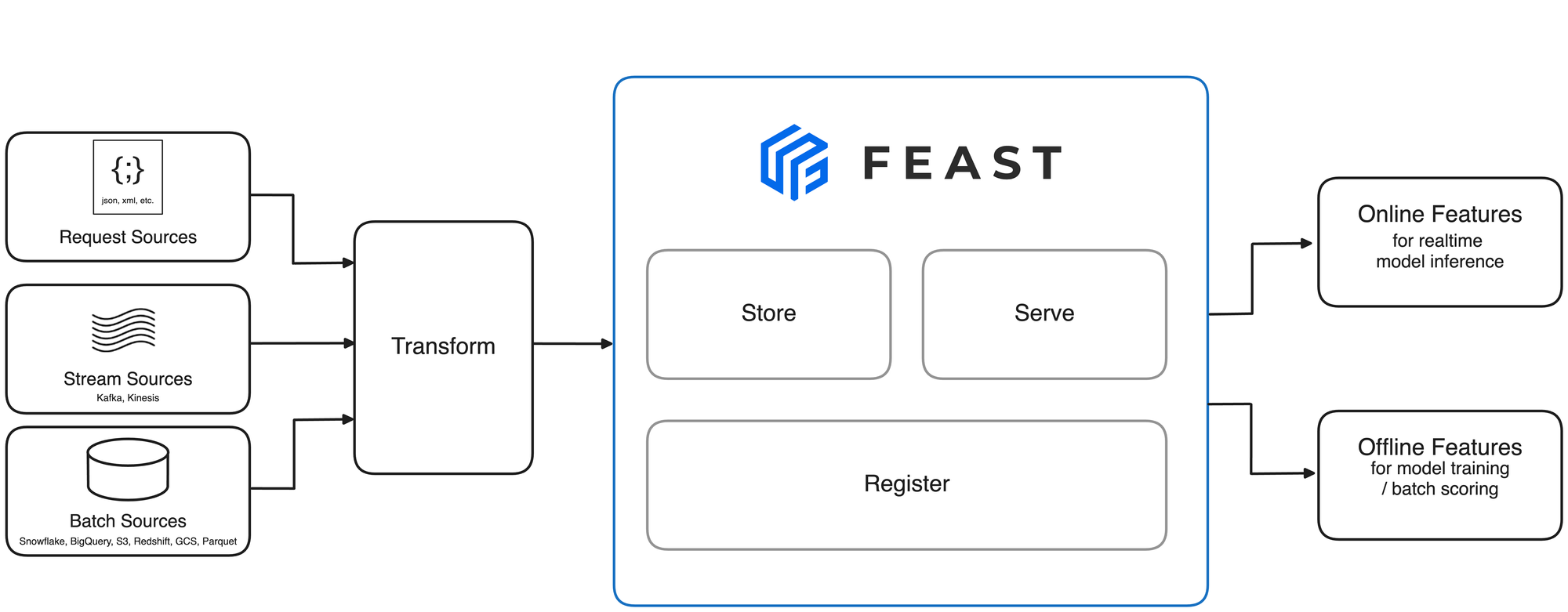
From official Feast Repo
Feast (Feature Store) is an open-source feature store built for ML teams to manage and serve machine learning features:
Open Source: Maintained by the community and used in many production-grade ML systems.
Real-time & Batch: Supports both batch and real-time data sources.
Pluggable Storage: Works with Redis, BigQuery, Snowflake, PostgreSQL, etc.
Online & Offline Store: Guarantees feature consistency between training and serving.
Integration: Works well with popular ML frameworks like TensorFlow, PyTorch, and Spark.
Use Cases:
Real-time fraud detection
Recommendation systems
Click-through rate prediction
🔗 https://github.com/feast-dev/feast
🔧 Tecton

Tecton is a managed feature store that helps productionize ML features at scale:
Enterprise-grade: Designed for large-scale deployments.
Declarative Pipelines: Define features using Python or SQL.
Feature Lineage & Monitoring: Built-in observability tools.
Consistent Feature Delivery: Ensures consistency across training and serving environments.
Streaming & Batch: Native support for both batch and real-time sources.
Strengths:
Automated feature transformation pipelines
Versioning and governance
Scales with modern data infra (e.g., Snowflake, Spark, Kafka)
AWS SageMaker Feature Store

Amazon SageMaker Feature Store is a fully-managed feature store service integrated with the AWS ecosystem:
Fully Managed: Serverless, scales with usage.
Integration with SageMaker: Seamless experience for AWS ML workflows.
Online and Offline Store: Syncs features for both training and real-time inference.
Data Security & Compliance: Built-in IAM, encryption, and logging.
Data Catalog Integration: Supports Glue Data Catalog and Athena.
Ideal for:
Teams already using AWS for ML
Large-scale training and inference pipelines
Data lineage and security-focused ML workflows
🔗 https://aws.amazon.com/sagemaker/feature-store/
📊 Feature Store Comparison Table
| Feature | Feast | Tecton | SageMaker Feature Store |
| Hosting | Self-hosted | Fully managed | Fully managed (AWS) |
| Real-time Feature Serving | ✅ | ✅ | ✅ |
| Batch Processing Support | ✅ | ✅ | ✅ |
| Online & Offline Store | ✅ | ✅ | ✅ |
| Integrations | Flexible | AWS, Snowflake, Kafka | Deep AWS integration |
| Observability & Monitoring | Basic | Advanced | AWS CloudWatch |
| Use Case Suitability | General purpose | Enterprise-scale | AWS-native ML workflows |
Example: Installing and Using Feast with CSV Data
1. Install Feast
pip install feast
2. Initialize Feast Project
feast init feast_project
cd feast_project
3. Add CSV File
Create a file named customer_engagement.csv with the following content:
customer_id,last_login_days,num_sessions,avg_session_duration,signup_date
1001,5,12,30.5,2021-01-01
1002,2,20,45.0,2021-02-15
1003,10,5,25.0,2021-03-20
Place it in the root of your Feast project.
4. Define Feature Repo (example_repo/feature_repo.py)
from datetime import timedelta
from feast import Entity, FeatureView, Field, FileSource
from feast.types import Int64, Float64

engagement_source = FileSource(
    path="customer_engagement.csv",
    timestamp_field="signup_date"
)

customer = Entity(name="customer_id", join_keys=["customer_id"])

engagement_fv = FeatureView(
    name="engagement_fv",
    entities=["customer_id"],
    ttl=timedelta(days=365),
    schema=[
        Field(name="last_login_days", dtype=Int64),
        Field(name="num_sessions", dtype=Int64),
        Field(name="avg_session_duration", dtype=Float64),
    ],
    source=engagement_source
)
5. Register Features
feast apply
6. Materialize Data
feast materialize-incremental $(date +%F)
7. Query Features
from feast import FeatureStore
import pandas as pd

store = FeatureStore(repo_path=".")

entity_df = pd.DataFrame.from_dict({
    "customer_id": [1001, 1003],
    "event_timestamp": ["2022-01-01", "2022-01-01"]
})

features = store.get_historical_features(
    entity_df=entity_df,
    features=[
        "engagement_fv:last_login_days",
        "engagement_fv:num_sessions",
        "engagement_fv:avg_session_duration"
    ]
).to_df()

print(features)
Expected Output
   customer_id      event_timestamp  last_login_days  num_sessions  avg_session_duration
0         1001  2022-01-01 00:00:00                5            12                 30.5
1         1003  2022-01-01 00:00:00               10             5                 25.0
💡Notes
Feast defaults to using SQLite as the online store.
You can configure Redis, PostgreSQL, or DynamoDB for production use.
For production, define
feature_store.yamlwith appropriate store and provider settings.
📖 Learning Resources
🔥 Challenges
💡 Perform basic feature engineering on a CSV dataset using Pandas
💡 Use scikit-learn pipelines to automate transformations
💡 Install Feast, initialize a repo, and define a feature view
💡 Simulate online/offline feature serving using Feast with a local SQLite store
💡 Write a blog post or GitHub README: "Intro to Feature Stores with Feast + Python"
💡 Try using Feast with Google Cloud BigQuery or Redis as the online store
🤷🏻 How to Participate?
✅ Complete the tasks and challenges.
✅ Document your progress and key takeaways on GitHub ReadMe, Medium, or Hashnode.
✅ Share the above in a LinkedIn post tagging me (Bittu Kumar), and use #30DaysOfMLOps to engage with the community!
Follow me on LinkedIn
Follow me on GitHub
Keep Learning……


