Day 22: Streamlining MLOps Pipelines with SageMaker and Vertex AI

I am Bittu Sharma, a DevOps & AI Engineer with a keen interest in building intelligent, automated systems. My goal is to bridge the gap between software engineering and data science, ensuring scalable deployments and efficient model operations in production.! 𝗟𝗲𝘁'𝘀 𝗖𝗼𝗻𝗻𝗲𝗰𝘁 I would love the opportunity to connect and contribute. Feel free to DM me on LinkedIn itself or reach out to me at bittush9534@gmail.com. I look forward to connecting and networking with people in this exciting Tech World.
📚 Key Learnings
Understand the MLOps capabilities of SageMaker and Vertex AI
Compare features of SageMaker Studio vs Vertex AI Workbench
Learn about integrations with Git, Terraform, and CI/CD
Get hands-on with training and deploying a simple model
🧠 Learn here
Let's start with Managed ML Platforms!
Managed ML Platform
A Managed ML Platform abstracts away infrastructure provisioning, scalability concerns, and low-level configurations.
It lets data scientists, ML engineers, and developers focus on model development and experimentation while the platform takes care of the rest.
A managed ML Platform Ideally should have:
Data Preparation & Labeling tools
AutoML capabilities
Model Training & Tuning (incl. hyperparameter optimization)
Model Deployment (real-time & batch)
Model Monitoring (drift detection, latency, accuracy)
Versioning & Reproducibility
Integrated Security & Compliance
Popular Managed ML Platforms
| Platform | Provider | Highlights |
| Amazon SageMaker | AWS | Fully managed, supports Studio IDE, Autopilot, Pipelines, Model Monitor |
| Vertex AI | Google Cloud | Unified platform, strong AutoML, integration with BigQuery & notebooks |
| Azure ML | Microsoft | MLOps support with Azure DevOps, drag-and-drop UI, scalable endpoints |
| Databricks ML | Databricks | ML on top of Spark, great for large-scale data workflows |
Why Use Managed ML Platforms?
🚀Faster model development lifecycle
💰 Cost-optimized compute (pay-as-you-go)
🔒 Built-in security and compliance
🔄 Scalable from prototype to production
🧑🔧 Reduced need for infra & DevOps skills
For now, we will focus on SageMaker & Vertex AI
Amazon SageMaker
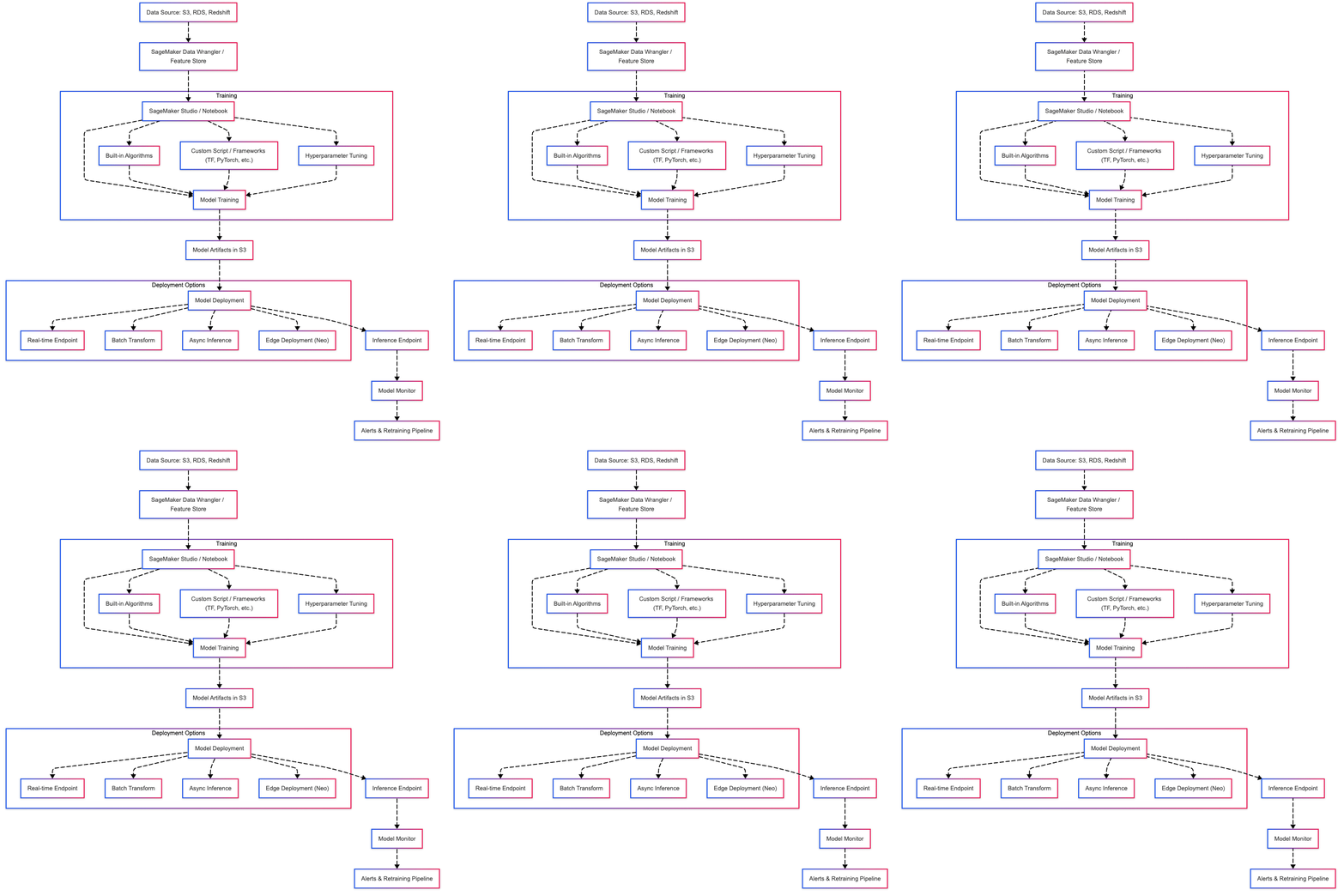
Amazon SageMaker is a fully managed service that provides tools to build, train, and deploy machine learning models quickly and at scale.
Features:
Data Preparation: Built-in Jupyter notebooks, SageMaker Data Wrangler, and Feature Store.
Model Building: Supports popular ML frameworks (TensorFlow, PyTorch, XGBoost), built-in algorithms, and custom containers.
Training: Distributed training, automatic model tuning (hyperparameter optimization).
Deployment: One-click model deployment to auto-scaling endpoints.
MLOps & Monitoring: Model monitoring, endpoint drift detection, A/B testing, CI/CD integration.
Components:
SageMaker Studio: Integrated visual interface for building ML workflows.
SageMaker Processing: For running data pre-processing and post-processing jobs.
SageMaker Training: Managed training jobs with distributed support.
SageMaker Inference: Real-time, batch, and asynchronous inference options.
SageMaker Pipelines: End-to-end ML pipeline orchestration.
Getting Started with SageMaker:
- Install AWS CLI & Boto3
pip install awscli boto3
Set up IAM Role with SageMaker permissions.
Launch SageMaker Notebook Instance or SageMaker Studio from AWS Console.
Example: Training a Built-in XGBoost Model
import sagemaker
from sagemaker import get_execution_role
from sagemaker.estimator import Estimator

role = get_execution_role()
sess = sagemaker.Session()

xgboost_container = sagemaker.image_uris.retrieve("xgboost", sess.boto_region_name, "1.5-1")

estimator = Estimator(
    image_uri=xgboost_container,
    role=role,
    instance_count=1,
    instance_type="ml.m5.large",
    output_path="s3://your-bucket/output",
    sagemaker_session=sess,
)

estimator.fit("s3://your-bucket/input")
Use Cases:
Predictive Analytics
Image and Text Classification
Time Series Forecasting
Anomaly Detection
Natural Language Processing (NLP)
Security & Compliance
VPC support for secure networking
KMS for encryption at rest
IAM roles for fine-grained access control
Audit trails via AWS CloudTrail
Deployment Options
Real-time Endpoints
Batch Transform
Asynchronous Inference
Edge Deployment via SageMaker Neo
🧠 Pro Tips
Use SageMaker Studio for an all-in-one visual experience.
Use Model Monitor to detect drift in production.
Optimize cost with spot instances and multi-model endpoints.
Vertex AI
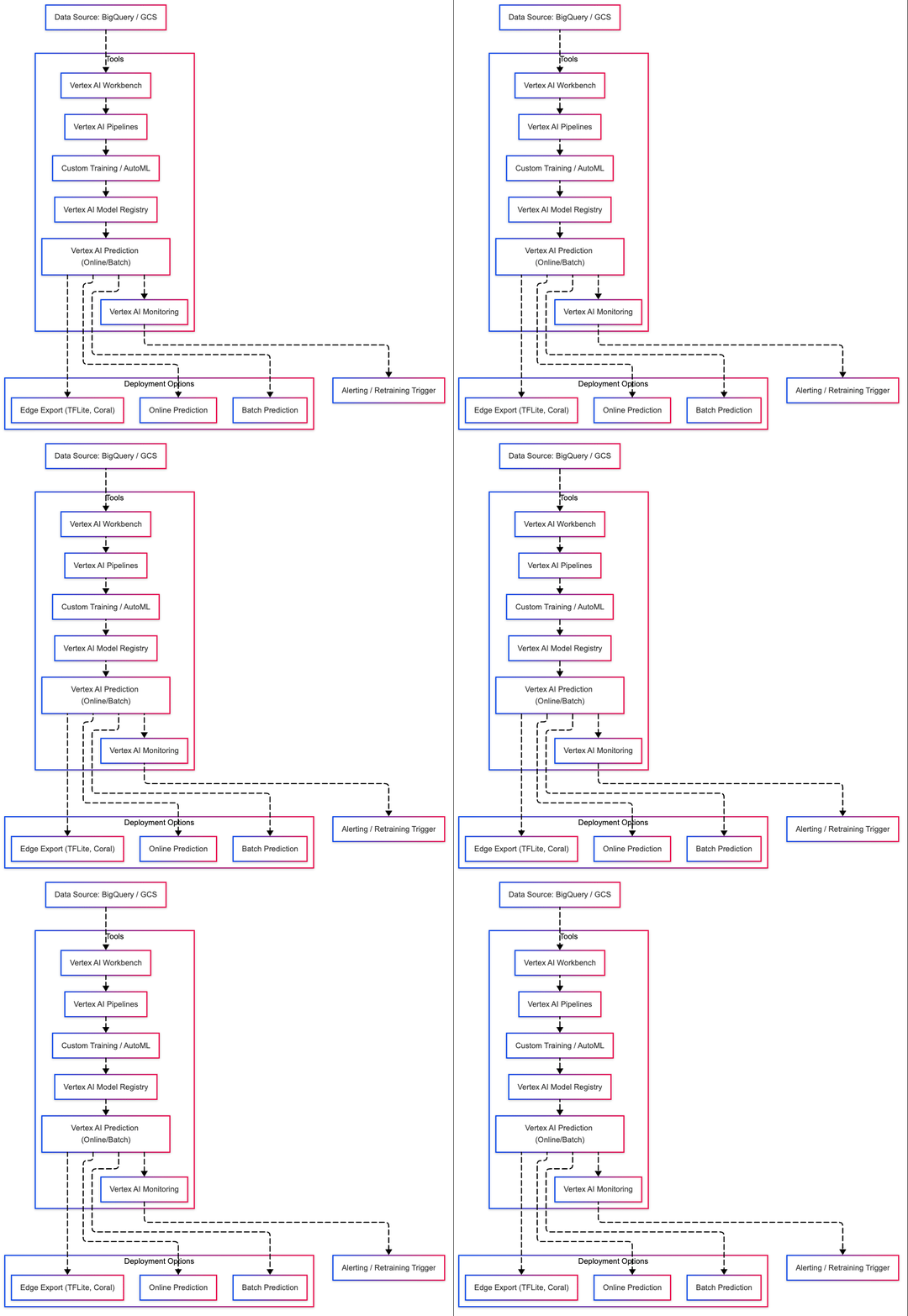
Vertex AI is Google Cloud’s managed machine learning platform that helps data scientists and ML engineers build, train, and deploy ML models faster using unified tools and services.
Features:
Unified Platform: Manage data, train models, and deploy them from a single interface.
Custom and AutoML Models: Supports AutoML for beginners and custom training for experts.
Integrated MLOps: Pipelines, CI/CD, and model monitoring.
Scalable Infrastructure: Train on CPUs, GPUs, TPUs.
Prebuilt & Custom Containers: Use optimized Google containers or bring your own.
Key Components:
Vertex AI Workbench: Managed JupyterLab notebooks with integration to BigQuery, GCS, etc.
Vertex AI Pipelines: Orchestrate ML workflows using Kubeflow Pipelines.
Vertex AI Training: Custom training with Docker containers or prebuilt frameworks.
Vertex AI Prediction: Online and batch prediction services.
Vertex AI Model Registry: Versioned model repository.
Vertex AI Experiments: Track model training runs and parameters.
Getting Started:
Enable Vertex AI API in Google Cloud Console.
Create a Cloud Storage bucket for datasets and model artifacts.
Install Google Cloud SDK & Libraries
pip install google-cloud-aiplatform
- Initialize Vertex AI SDK
from google.cloud import aiplatform

aiplatform.init(project='your-project-id', location='us-central1')
- Example: Train a Custom Model
job = aiplatform.CustomContainerTrainingJob(
    display_name="my-training-job",
    container_uri="gcr.io/my-project/my-training-image",
    model_serving_container_image_uri="us-docker.pkg.dev/vertex-ai/prediction/sklearn-cpu.0-24:latest"
)

model = job.run(
    model_display_name="my-model",
    replica_count=1,
    machine_type="n1-standard-4",
    args=["--epochs", "5"]
)
Use Cases:
Image Classification & Object Detection
Natural Language Processing (NLP)
Time Series Forecasting
Recommendation Systems
Tabular Data Models
Security & Compliance:
IAM for access control
VPC Service Controls
CMEK for data encryption
Audit logs and monitoring via Cloud Logging
🧠 Pro Tips:
Use Workbenches to interactively develop and test code.
Track experiment runs using
Vertex AI Experiments.Schedule training using Vertex AI Pipelines with CI/CD triggers.
Monitor drift and health with Vertex AI Model Monitoring.
Deployment Options:
Online Predictions (Real-time Inference)
Batch Predictions
Export to Edge via TensorFlow Lite or Coral
SageMaker vs Vertex AI
| Feature | SageMaker Studio | Vertex AI Workbench |
| Platform | AWS | Google Cloud |
| IDE Integration | Fully integrated JupyterLab-based IDE | JupyterLab integration with enhanced GCP tools |
| Notebook Type | Jupyter notebooks, SageMaker notebooks | Jupyter notebooks (managed and user-managed) |
| Compute Options | On-demand, spot, and SageMaker-provided ML instances | Custom VM types, GPU/TPU support |
| Auto-scaling | Yes (via SageMaker endpoints or pipelines) | Yes (via Vertex AI Training and Workbench) |
| Built-in Version Control | Git integration built-in | GitHub integration available |
| ML Frameworks Support | TensorFlow, PyTorch, MXNet, Scikit-learn, etc. | TensorFlow, PyTorch, Scikit-learn, XGBoost, etc. |
| Experiment Tracking | SageMaker Experiments | Vertex AI Experiments |
| Pipeline Support | SageMaker Pipelines | Vertex AI Pipelines |
| Model Registry | SageMaker Model Registry | Vertex AI Model Registry |
| Monitoring and Debugging | SageMaker Debugger, Model Monitor | Vertex AI Model Monitoring |
| MLOps Integration | SageMaker Projects with CI/CD templates | Cloud Build, Vertex Pipelines for MLOps |
| Security and IAM | Integrated with AWS IAM | Integrated with Google IAM |
| Data Access | Access to S3, Athena, Redshift, etc. | Access to BigQuery, Cloud Storage, etc. |
| Pricing | Pay-per-use based on compute and storage | Pay-per-use with VM cost + notebook pricing |
| Notebook Scheduling | Not native (can be done via Lambda/Step Functions) | Built-in scheduled executions |
| Custom Container Support | Yes (bring your own container to Studio) | Yes (via custom containers on Notebooks or Pipelines) |
| Extension Ecosystem | Supports Jupyter extensions, Studio add-ons | Supports JupyterLab extensions |
| Multi-user Support | Yes, with IAM roles and domain setup | Yes, with GCP IAM and shared Workbench environments |
ML Platform Integrations: Git, Terraform, CI/CD with SageMaker & Vertex AI
Version Control with Git
SageMaker
SageMaker Studio Git Integration: Built-in support to clone, commit, and push Git repositories from Studio UI.
Best Practices:
Use Git for managing notebooks, training scripts, Dockerfiles, and pipeline definitions.
Organize repos with
/src,/notebooks,/pipelines,/deployfolders.
Vertex AI
Workbench Git Integration: Managed JupyterLab with Git extension enabled.
Best Practices:
Store Kubeflow pipeline YAMLs and training scripts in Git.
Track experiment metadata and commit hashes for reproducibility.
Infrastructure as Code (IaC) with Terraform
SageMaker
Terraform AWS Provider: Supports creating resources like:
aws_sagemaker_notebook_instanceaws_sagemaker_modelaws_sagemaker_endpoint_configaws_sagemaker_endpoint
Example:
resource "aws_sagemaker_model" "example" {
  name               = "example-model"
  execution_role_arn = aws_iam_role.sagemaker_role.arn
  primary_container {
    image = "123456789012.dkr.ecr.us-east-1.amazonaws.com/my-image"
    model_data_url = "s3://bucket/model.tar.gz"
  }
}
Vertex AI
Terraform GCP Provider: Supports:
google_vertex_ai_endpointgoogle_vertex_ai_modelgoogle_vertex_ai_pipeline_jobgoogle_vertex_ai_featurestore
Example:
resource "google_vertex_ai_model" "model" {
  display_name = "vertex-model"
  container_spec {
    image_uri = "gcr.io/project/image"
  }
}
CI/CD Integration
SageMaker
CI/CD Tools: GitHub Actions, CodePipeline, Jenkins
Popular Tools:
sagemaker-training-toolkit&sagemaker-pipelineSDKsAmazon SageMaker Projectsfor CI/CD automation
Example GitHub Action:
jobs:
  train-deploy:
    runs-on: ubuntu-latest
    steps:
      - uses: actions/checkout@v2
      - name: Setup Python
        uses: actions/setup-python@v2
      - run: pip install sagemaker
      - run: python pipeline.py --train
Vertex AI
CI/CD Tools: Cloud Build, GitHub Actions, Tekton
Popular Practices:
Trigger pipeline runs using Cloud Build triggers
Store and version datasets/models in GCS
Cloud Build YAML Example:
steps:
  - name: 'gcr.io/cloud-builders/gcloud'
    args:
      - ai
      - custom-jobs
      - create
      - --display-name=my-job
      - --region=us-central1
Hands-On: Train and Deploy a Simple Model on SageMaker & Vertex AI
Part 1: Amazon SageMaker
Train and deploy a simple scikit-learn model using SageMaker built-in containers.
Prerequisites
AWS account with SageMaker access
S3 bucket
IAM role with SageMaker permissions
Python environment with
boto3,sagemaker
Steps
1. Prepare Training Script: train.py
from sklearn.ensemble import RandomForestClassifier
from sklearn.datasets import load_iris
from sklearn.model_selection import train_test_split
import joblib

X, y = load_iris(return_X_y=True)
X_train, X_test, y_train, y_test = train_test_split(X, y, test_size=0.2)

model = RandomForestClassifier()
model.fit(X_train, y_train)

joblib.dump(model, '/opt/ml/model/model.joblib')
2. Upload Script to S3
aws s3 cp train.py s3://your-bucket/code/train.py
3. Train with SageMaker
from sagemaker.sklearn.estimator import SKLearn
from sagemaker import get_execution_role

sklearn_estimator = SKLearn(
    entry_point='train.py',
    role=get_execution_role(),
    instance_type='ml.m5.large',
    framework_version='0.23-1',
    py_version='py3',
    sagemaker_session=sess
)
sklearn_estimator.fit()
4. Deploy as Endpoint
predictor = sklearn_estimator.deploy(instance_type='ml.m5.large', initial_instance_count=1)
predictor.predict([[5.1, 3.5, 1.4, 0.2]])
5. Clean Up
predictor.delete_endpoint()
Part 2: Google Vertex AI
Train and deploy a simple scikit-learn model using Vertex AI custom training job.
Prerequisites
GCP project with Vertex AI API enabled
GCS bucket
Python environment with
google-cloud-aiplatform
Steps
1. Create Training Script: train.py
Same as above.
2. Build Docker Image
Create Dockerfile:
FROM python:3.9
RUN pip install scikit-learn joblib google-cloud-storage
COPY train.py .
CMD ["python", "train.py"]
Build & push:
gcloud builds submit --tag gcr.io/YOUR_PROJECT_ID/iris-trainer
3. Submit Custom Job
from google.cloud import aiplatform

aiplatform.init(project='YOUR_PROJECT_ID', location='us-central1')

job = aiplatform.CustomContainerTrainingJob(
    display_name='iris-train',
    container_uri='gcr.io/YOUR_PROJECT_ID/iris-trainer',
    model_serving_container_image_uri='us-docker.pkg.dev/vertex-ai/prediction/sklearn-cpu.0-24:latest'
)

model = job.run(model_display_name='iris-model', replica_count=1, machine_type='n1-standard-4')
4. Deploy Model
endpoint = model.deploy(machine_type='n1-standard-4')
endpoint.predict(instances=[[5.1, 3.5, 1.4, 0.2]])
5. Clean Up
endpoint.undeploy_all()
endpoint.delete()
🔥 Challenges
Launch a notebook in SageMaker Studio or Vertex AI Workbench
Train a model using built-in algorithm or sklearn
Deploy as a real-time endpoint
Track experiment metadata (parameters, metrics)
Enable drift monitoring or logging on deployed endpoint
Use CloudWatch (SageMaker) or Logging (Vertex) to view logs
Create a simple pipeline with preprocessing, training, evaluation steps
Set up a CI/CD job (GitHub Actions / Cloud Build) to retrain on commit
Compare latency and performance between SageMaker & Vertex AI endpoints
Use SageMaker Model Registry or Vertex AI Model Registry to manage versions
🤷🏻 How to Participate?
✅ Complete the tasks and challenges.
✅ Document your progress and key takeaways on GitHub ReadMe, Medium, or Hashnode.
Follow me on LinkedIn
Follow me on GitHub
Keep Learning……


