AI Document Helper: Intelligent Document Assistant with RAG & MLOps

I am Bittu Sharma, a DevOps & AI Engineer with a keen interest in building intelligent, automated systems. My goal is to bridge the gap between software engineering and data science, ensuring scalable deployments and efficient model operations in production.! 𝗟𝗲𝘁'𝘀 𝗖𝗼𝗻𝗻𝗲𝗰𝘁 I would love the opportunity to connect and contribute. Feel free to DM me on LinkedIn itself or reach out to me at bittush9534@gmail.com. I look forward to connecting and networking with people in this exciting Tech World.
AI-powered conversational document assistant with RAG, Qdrant & a complete MLOps pipeline using Docker Compose
💡
Hey — It's Bittu Sharma 👋
This project brings together real-world components of modern AI systems—RAG, vector databases, LLM inference, and automated pipelines—into one practical, production-style project.
It builds hands-on expertise in running scalable AI features end-to-end, from data ingestion to model serving and UI integration.
🧠 Learn here
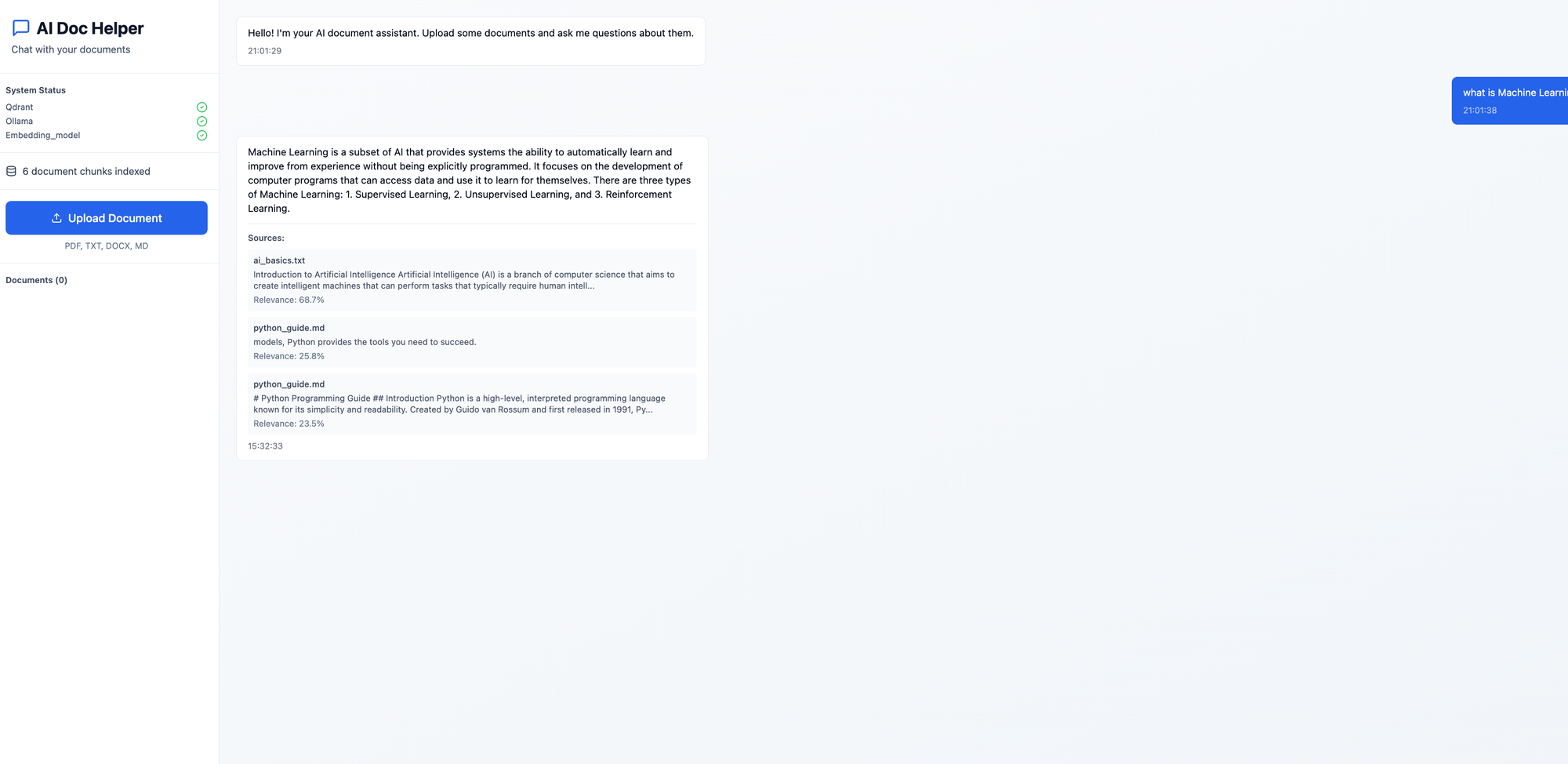
About this project:
A complete AI-powered document assistant with a modern UI, MLOps pipeline, and end-to-end testing. Built entirely with open-source technologies.
Features
🤖 AI Chat Interface: Interactive chat with your documents using RAG (Retrieval Augmented Generation)
📄 Document Processing: Support for PDF, TXT, DOCX, and Markdown files
🎨 Modern UI: Beautiful React interface with TailwindCSS and shadcn/ui components
🔄 MLOps Pipeline: Automated training pipeline for processing new documents
🐳 Docker Compose: One-command deployment
✅ End-to-End Testing: Comprehensive test suite
Tech Stack
Frontend: React, TailwindCSS, shadcn/ui, Lucide Icons
Backend: FastAPI (Python)
LLM: Ollama (llama3.2)
Embeddings: sentence-transformers (all-MiniLM-L6-v2)
Vector DB: Qdrant
Document Processing: PyPDF2, python-docx, langchain
Project Architecture
┌─────────────┐
│   Browser   │
└──────┬──────┘
       │
       ▼
┌─────────────────────────────────────────────────────┐
│              Frontend (React)                        │
│  - Modern UI with TailwindCSS                       │
│  - Document upload interface                        │
│  - Chat interface                                   │
│  - Real-time status monitoring                      │
└──────────────────┬──────────────────────────────────┘
                   │
                   ▼
┌─────────────────────────────────────────────────────┐
│              Backend (FastAPI)                       │
│  - REST API endpoints                               │
│  - Document processing                              │
│  - RAG engine                                       │
│  - Query handling                                   │
└──────┬────────────────┬─────────────────────────────┘
       │                │
       ▼                ▼
┌─────────────┐  ┌─────────────┐
│   Qdrant    │  │   Ollama    │
│  (Vector    │  │    (LLM)    │
│   Database) │  │             │
└─────────────┘  └─────────────┘
       ▲
       │
┌──────┴──────────────────────────────────────────────┐
│         MLOps Training Pipeline                      │
│  - Document ingestion                               │
│  - Text extraction                                  │
│  - Chunking                                         │
│  - Embedding generation                             │
│  - Vector indexing                                  │
└─────────────────────────────────────────────────────┘
Components
1. Frontend (React + TailwindCSS)
Technology Stack:
React 18
TailwindCSS for styling
Axios for API calls
Lucide React for icons
Responsibilities:
User interface for document upload
Chat interface for querying documents
Display of answers with source citations
System health monitoring
Document management
Key Features:
Responsive design
Real-time status updates
File upload with drag-and-drop
Message history
Source highlighting
2. Backend (FastAPI)
Technology Stack:
FastAPI (Python)
Uvicorn (ASGI server)
Pydantic for data validation
AsyncIO for concurrent operations
Responsibilities:
API endpoint management
Request validation
Document processing orchestration
RAG query handling
Error handling and logging
Key Endpoints:
GET /- Root endpointGET /health- Health checkPOST /upload- Upload documentsPOST /query- Query documentsGET /documents- List documentsDELETE /documents/{filename}- Delete documentGET /stats- System statistics
3. RAG Engine
Components:
a. Document Processor
Extracts text from PDF, DOCX, TXT, MD files
Splits text into overlapping chunks
Preserves document metadata
b. Embedding Model
Model:
sentence-transformers/all-MiniLM-L6-v2Dimension: 384
Fast and efficient for semantic search
c. Vector Database (Qdrant)
Stores document embeddings
Enables similarity search
Supports filtering and metadata
d. LLM (Ollama)
Model: llama3.2 (configurable)
Generates natural language answers
Context-aware responses
RAG Workflow:
User submits a question
Question is embedded using the same model
Similar chunks are retrieved from Qdrant
Retrieved chunks are used as context
LLM generates answer based on context
Answer and sources are returned to user
4. Vector Database (Qdrant)
Features:
High-performance vector similarity search
Supports filtering and metadata
REST and gRPC APIs
Persistent storage
Configuration:
Collection: "documents"
Distance metric: Cosine similarity
Vector dimension: 384
5. LLM Service (Ollama)
Features:
Local LLM inference
No external API dependencies
Privacy-preserving
Multiple model support
Supported Models:
llama3.2 (default)
mistral
codellama
And many others
6. MLOps Training Pipeline
Technology Stack:
Python 3.11
sentence-transformers
Qdrant client
Document processing libraries
Workflow:
Scan document directories
Process each document:
Extract text
Split into chunks
Generate embeddings
Index chunks in Qdrant
Log statistics
Execution:
Triggered manually via Docker Compose
Can be scheduled with cron
Supports incremental updates
Data Flow
Document Upload Flow
User uploads file
    ↓
Frontend sends to /upload
    ↓
Backend validates file type
    ↓
File saved to disk
    ↓
Document processor extracts text
    ↓
Text split into chunks
    ↓
Embeddings generated
    ↓
Chunks indexed in Qdrant
    ↓
Success response to user
Query Flow
User asks question
    ↓
Frontend sends to /query
    ↓
Question embedded
    ↓
Similarity search in Qdrant
    ↓
Top-k relevant chunks retrieved
    ↓
Context prepared for LLM
    ↓
LLM generates answer
    ↓
Answer + sources returned
    ↓
Displayed in UI
Now, let's get hands-on with the project!
Prerequisites
Docker and Docker Compose
At least 8GB RAM (16GB recommended for larger models)
10GB free disk space
File Structure
.
├── backend/              # FastAPI backend
│   ├── main.py          # API endpoints
│   ├── rag_engine.py    # RAG implementation
│   ├── document_processor.py
│   └── tests/           # Backend tests
├── frontend/            # React frontend
│   ├── src/
│   │   ├── components/  # UI components
│   │   └── App.jsx      # Main app
│   └── package.json
├── mlops/               # Training pipeline
│   ├── train.py         # Training script
│   └── Dockerfile
├── data/                # Document storage
│   ├── sample_docs/     # Sample documents
│   └── test_docs/       # Test documents
├── scripts/             # Utility scripts
│   └── run_tests.sh     # Test runner
└── docker-compose.yml
Installation
Clone and navigate to the project:
 git clone https://github.com/sd031/AI-Document-Helper.git
 cd AI-Document-Helper
Start all services:
docker-compose up -dPull the LLM model (first time only):
docker exec -it ollama ollama pull llama3.2Process sample documents:
docker-compose --profile training up mlopsAccess the application:
Frontend: http://localhost:3000
Backend API: http://localhost:8000
API Docs: http://localhost:8000/docs
Qdrant Dashboard: http://localhost:6333/dashboard
If you would like above steps to be completely automated, refer to : ./scripts/setup.sh
#!/bin/bash

# AI Document Helper - Setup Script
# This script sets up the entire system

set -e  # Exit on error

echo "=========================================="
echo "AI Document Helper - Setup"
echo "=========================================="
echo ""

# Colors
GREEN='\033[0;32m'
YELLOW='\033[1;33m'
NC='\033[0m'

echo "Step 1: Checking prerequisites..."
echo "----------------------------------"

# Check Docker
if ! command -v docker &> /dev/null; then
    echo "Error: Docker is not installed. Please install Docker first."
    exit 1
fi
echo -e "${GREEN}✓ Docker is installed${NC}"

# Check Docker Compose
if ! command -v docker-compose &> /dev/null; then
    echo "Error: Docker Compose is not installed. Please install Docker Compose first."
    exit 1
fi
echo -e "${GREEN}✓ Docker Compose is installed${NC}"

echo ""

echo "Step 2: Building Docker images..."
echo "----------------------------------"
docker-compose build

echo ""

echo "Step 3: Starting services..."
echo "----------------------------"
docker-compose up -d

echo ""

echo "Step 4: Waiting for services to be ready..."
echo "--------------------------------------------"

# Wait for Ollama
echo "Waiting for Ollama to start..."
sleep 10

# Pull LLM model
echo "Pulling Ollama model (this may take a few minutes)..."
docker exec ollama ollama pull llama3.2

echo ""

echo "Step 5: Running training pipeline..."
echo "-------------------------------------"
docker-compose --profile training up mlops

echo ""

echo "=========================================="
echo "Setup Complete!"
echo "=========================================="
echo ""
echo -e "${GREEN}The AI Document Helper is ready to use!${NC}"
echo ""
echo "Access points:"
echo "  - Frontend UI:    http://localhost:3000"
echo "  - Backend API:    http://localhost:8000"
echo "  - API Docs:       http://localhost:8000/docs"
echo "  - Qdrant:         http://localhost:6333/dashboard"
echo ""
echo "Next steps:"
echo "  1. Open http://localhost:3000 in your browser"
echo "  2. Upload documents or use the sample documents"
echo "  3. Ask questions about your documents"
echo ""
echo "To run tests:"
echo "  ./scripts/run_tests.sh"
echo ""
echo "To stop services:"
echo "  docker-compose down"
echo ""
In future any document you can either upload via the UI or put them in the data/sample_docs folder and start the training pipeline via executing:
docker-compose --profile training up mlops
Running Tests
# Run end-to-end tests
./scripts/run_tests.sh
Querying Documents
Use the web interface or API:
curl -X POST http://localhost:8000/query \
  -H "Content-Type: application/json" \
  -d '{"question": "What is machine learning?"}'
Configuration
Edit environment variables in docker-compose.yml:
OLLAMA_MODEL: Change LLM model (default: llama3.2)EMBEDDING_MODEL: Change embedding modelCHUNK_SIZE: Document chunk size for processingCHUNK_OVERLAP: Overlap between chunks
Troubleshooting
Ollama model not found
docker exec -it ollama ollama pull llama3.2
Port already in use
Change ports in docker-compose.yml
Out of memory
Reduce model size or increase Docker memory limit


