30-Day Guide to Model Deployment: Day 27 Serverless Solutions

I am Bittu Sharma, a DevOps & AI Engineer with a keen interest in building intelligent, automated systems. My goal is to bridge the gap between software engineering and data science, ensuring scalable deployments and efficient model operations in production.! 𝗟𝗲𝘁'𝘀 𝗖𝗼𝗻𝗻𝗲𝗰𝘁 I would love the opportunity to connect and contribute. Feel free to DM me on LinkedIn itself or reach out to me at bittush9534@gmail.com. I look forward to connecting and networking with people in this exciting Tech World.
📚 Key Learnings
Understand what serverless architectures are and their advantages in ML deployments.
Learn how to deploy models on AWS Lambda, Google Cloud Functions, and Azure Functions.
Explore API Gateway integration for exposing models as REST endpoints.
Implement cold start optimization strategies for serverless ML workloads.
Learn to manage model storage in S3, GCS, or Blob Storage for serverless inference.
🧠 Learn here
What is Serverless Architecture ?
Serverless architecture is a cloud computing execution model where the cloud provider dynamically manages the allocation and provisioning of servers. Developers focus solely on writing code in the form of small, independent functions, while the underlying infrastructure is fully managed by the provider. This eliminates the need to maintain physical servers or virtual machine instances.
Popular serverless services include:
AWS Lambda
Google Cloud Functions
Azure Functions
In serverless computing, you are billed only for the compute time consumed—there are no charges when code is not running.
Advantages of Serverless Architecture
No Server Management: No need to maintain or patch servers.
Automatic Scaling: Handles varying workloads seamlessly.
Cost Efficiency: Pay only for the compute time used.
Faster Time to Market: Focus on writing and deploying functions without infrastructure setup.
High Availability: Built-in redundancy and failover provided by cloud providers.
How it works?
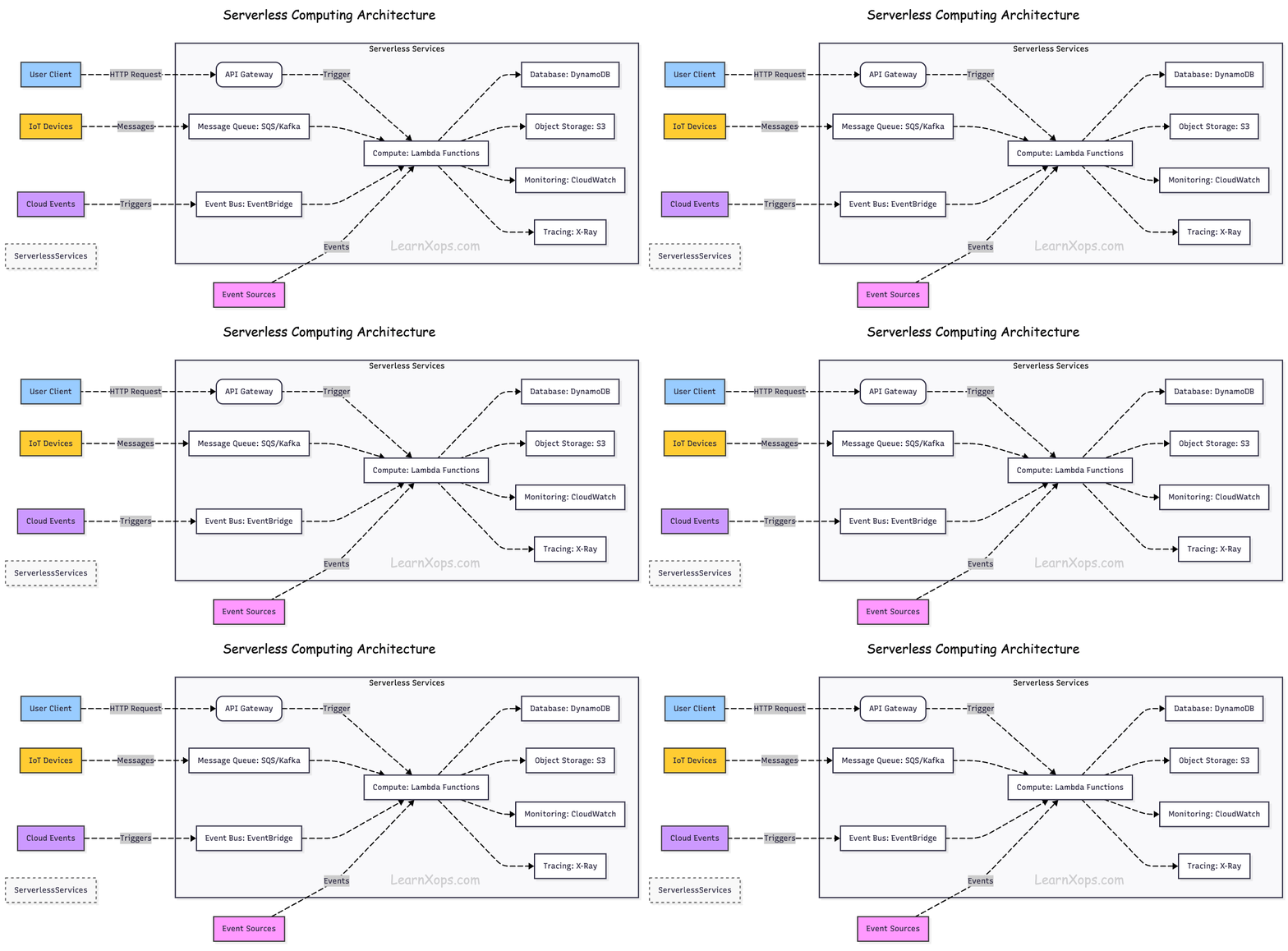
Event-Driven Execution: Functions are triggered by events (HTTP requests, database changes, file uploads, etc.).
Managed Infrastructure: The cloud provider automatically provisions, scales, and manages servers.
Stateless Functions: Each function runs in isolation and does not store state between executions.
Automatic Scaling: Functions scale up and down automatically based on demand.
Advantages of Serverless in ML Deployments
Serverless architecture offers unique benefits for Machine Learning (ML) deployments:
1. On-Demand Inference
ML inference functions can be triggered by events (API requests, file uploads) and run only when needed.
Reduces idle compute costs for infrequent prediction workloads.
2. Elastic Scaling for Spiky Traffic
Automatically handles sudden bursts in prediction requests without pre-provisioning.
Ideal for seasonal or event-driven ML applications.
3. Simplified Model Deployment
Models can be packaged into lightweight serverless functions.
Quick deployment without managing Kubernetes clusters or EC2 instances.
4. Integration with Cloud Services
Easy integration with cloud storage (S3, GCS), databases, message queues, and data pipelines.
Enables real-time triggers (e.g., new image in bucket → trigger image classification).
5. Cost-Effective for Low-Volume Use Cases
Pay only when the ML model is invoked.
Suitable for prototypes, experiments, and infrequent prediction scenarios.
6. Multi-Language & Environment Support
- Supports multiple runtimes (Python, Go, Node.js, Java), making it easy to deploy models in preferred frameworks (TensorFlow, PyTorch, Scikit-learn).
Example Use Cases in ML
Real-Time Image Classification: Triggered by file upload.
Chatbot Inference: Triggered by user messages.
Fraud Detection: Triggered by transaction events.
Recommendation Engines: Triggered by user interactions.
Sentiment Analysis: Triggered by incoming text data.
how to deploy models on AWS Lambda, Google Cloud Functions, and Azure Functions.
Serverless ML — Deploying Models on AWS Lambda, Google Cloud Functions, and Azure Functions
Prerequisites
Python 3.10+ locally
Basic model artifact (e.g.,
model.onnxor pickled.pt/.pkl)Cloud CLIs installed and logged in:
AWS:
aws,sam(optional)GCP:
gcloudAzure:
az,func(Azure Functions Core Tools)
Container runtime (Docker) if using container-based functions
Tip: Prefer ONNX or TorchScript for portable CPU inference.
Common Patterns:
Store model in object storage (S3/GCS/Blob). Download once, cache in /tmp or global var.
Global scope cache: Load model at import time to reuse across warm invocations.
Small deps: Use light runtimes; avoid heavy scientific stacks unless using container images.
Batching: Accept arrays of items to reduce per-invocation overhead.
Timeouts & memory: Increase memory to speed CPU-bound inference; set timeouts liberally.
Observability: Log latency, input size, and cold/warm flag.
Example global cache pattern:
# common_cache.py
import os, time
_model = None

def get_model(loader):
    global _model
    if _model is None:
        t0 = time.time()
        _model = loader()
        print(f"model_loaded_ms={(time.time()-t0)*1000:.1f}")
    return _model
AWS Lambda (HTTP via API Gateway or Lambda Function URL)
Option A — ZIP + Lambda Layer (lightweight deps)
Folder Structure
aws-lambda-zip/
├─ app.py           # handler
├─ requirements.txt # only light deps (e.g., onnxruntime, numpy)
└─ model/           # optional: small model (<50 MB). Prefer S3.
app.py (downloads from S3 on first run, caches globally)
import json, os, boto3
from common_cache import get_model

S3_BUCKET = os.environ["MODEL_BUCKET"]
S3_KEY    = os.environ["MODEL_KEY"]
LOCAL     = "/tmp/model.onnx"

s3 = boto3.client("s3")

def _load_model():
    if not os.path.exists(LOCAL):
        s3.download_file(S3_BUCKET, S3_KEY, LOCAL)
    # Load your model (example for ONNX)
    import onnxruntime as ort
    return ort.InferenceSession(LOCAL)

model = None

def handler(event, context):
    global model
    model = model or get_model(_load_model)
    body = json.loads(event.get("body", "{}"))
    x = body.get("inputs", [])
    # Adapt to your model's I/O
    outputs = model.run(None, {model.get_inputs()[0].name: x})
    return {"statusCode": 200, "body": json.dumps({"outputs": outputs[0]})}
Deploy (quick start)
# Install deps locally for packaging (Linux-compatible wheels)
pip install -r requirements.txt -t ./package
cp -r app.py common_cache.py package/
(cd package && zip -r ../function.zip .)

aws lambda create-function \
  --function-name ml-infer-zip \
  --runtime python3.11 \
  --handler app.handler \
  --role arn:aws:iam::<ACCOUNT>:role/<LambdaExecRole> \
  --timeout 30 --memory-size 2048 \
  --environment Variables={MODEL_BUCKET=<bucket>,MODEL_KEY=<key>} \
  --zip-file fileb://function.zip

# HTTP endpoint (simple):
aws lambda create-function-url-config \
  --function-name ml-infer-zip \
  --auth-type NONE
When to use: Small models & lightweight deps (<50–100 MB unzipped). For larger stacks, use container images.
Option B — Container Image (ECR)
Dockerfile (AWS base image includes runtime)
FROM public.ecr.aws/lambda/python:3.11
COPY requirements.txt ./
RUN pip install -r requirements.txt
COPY app.py common_cache.py ./
CMD ["app.handler"]
Build & deploy
aws ecr create-repository --repository-name ml-infer || true
aws ecr get-login-password | docker login --username AWS --password-stdin <acct>.dkr.ecr.<region>.amazonaws.com

docker build -t ml-infer .
docker tag ml-infer:latest <acct>.dkr.ecr.<region>.amazonaws.com/ml-infer:latest
docker push <acct>.dkr.ecr.<region>.amazonaws.com/ml-infer:latest

aws lambda create-function \
  --function-name ml-infer-img \
  --package-type Image \
  --code ImageUri=<acct>.dkr.ecr.<region>.amazonaws.com/ml-infer:latest \
  --role arn:aws:iam::<ACCOUNT>:role/<LambdaExecRole> \
  --timeout 60 --memory-size 4096
Tuning
Provisioned Concurrency to reduce cold starts.
Reserved Concurrency to cap cost.
x86_64 vs arm64: arm64 often cheaper/faster for CPU-bound.
Google Cloud Functions (2nd Gen, HTTP)
Folder Structure
gcf/
├─ main.py
├─ requirements.txt
└─ .gcloudignore
main.py (Flask-style HTTP function)
import functions_framework, os, json
from google.cloud import storage
from common_cache import get_model

BUCKET=os.environ["MODEL_BUCKET"]
KEY=os.environ["MODEL_KEY"]
LOCAL="/tmp/model.onnx"

@functions_framework.http
def infer(request):
    model = get_model(load_model)
    data = request.get_json(silent=True) or {}
    x = data.get("inputs", [])
    outputs = model.run(None, {model.get_inputs()[0].name: x})
    return (json.dumps({"outputs": outputs[0]}), 200, {"Content-Type": "application/json"})

def load_model():
    if not os.path.exists(LOCAL):
        client = storage.Client()
        client.bucket(BUCKET).blob(KEY).download_to_filename(LOCAL)
    import onnxruntime as ort
    return ort.InferenceSession(LOCAL)
Deploy
gcloud functions deploy ml-infer \
  --gen2 --region=<region> \
  --runtime=python311 --entry-point=infer \
  --trigger-http --allow-unauthenticated \
  --set-env-vars=MODEL_BUCKET=<bucket>,MODEL_KEY=<key> \
  --memory=2GiB --timeout=60s --min-instances=0 --max-instances=50
Tuning
min-instances > 0 reduces cold starts (costs idle).
Prefer regional to reduce latency.
For heavier models consider Cloud Run (container) for more CPU/RAM.
Azure Functions (Python v2 model, HTTP trigger)
Create project
func init azfunc-ml --python
cd azfunc-ml
func new --name infer --template "HTTP trigger"
infer/__init__.py
import json, os, azure.functions as func
from azure.storage.blob import BlobClient
from common_cache import get_model

BUCKET=os.environ["MODEL_CONTAINER"]
KEY=os.environ["MODEL_BLOB"]
CONN=os.environ["AZURE_STORAGE_CONNECTION_STRING"]
LOCAL="/tmp/model.onnx"

def load_model():
    if not os.path.exists(LOCAL):
        bc = BlobClient.from_connection_string(CONN, container_name=BUCKET, blob_name=KEY)
        with open(LOCAL, "wb") as f: f.write(bc.download_blob().readall())
    import onnxruntime as ort
    return ort.InferenceSession(LOCAL)

model=None

def main(req: func.HttpRequest) -> func.HttpResponse:
    global model
    model = model or get_model(load_model)
    data = req.get_json(silent=True) or {}
    x = data.get("inputs", [])
    outputs = model.run(None, {model.get_inputs()[0].name: x})
    return func.HttpResponse(json.dumps({"outputs": outputs[0]}), mimetype="application/json")
requirements.txt
azure-functions
azure-storage-blob
onnxruntime
numpy
Create Function App & Deploy
# Create a resource group, storage, and a Premium plan for better cold-starts
az group create -n rg-ml -l <region>
az storage account create -n <storage> -g rg-ml -l <region> --sku Standard_LRS
az functionapp plan create -g rg-ml -n plan-ml --location <region> --number-of-workers 1 --sku EP1
az functionapp create -g rg-ml -p plan-ml -n func-ml-infer --storage-account <storage> --runtime python --functions-version 4

# App settings
az functionapp config appsettings set -g rg-ml -n func-ml-infer \
  --settings AZURE_STORAGE_CONNECTION_STRING="$(az storage account show-connection-string -n <storage> -g rg-ml -o tsv)" \
             MODEL_CONTAINER=<container> MODEL_BLOB=<blob>

# Deploy
func azure functionapp publish func-ml-infer
Tuning
Use Premium (EP) or Dedicated for pre-warmed instances.
WEBSITE_RUN_FROM_PACKAGE=1 speeds cold starts.
Heavy models? Consider Azure Container Apps/AKS for more CPU/RAM.
Testing the Endpoints
curl -X POST "$LAMBDA_URL" -H 'Content-Type: application/json' -d '{"inputs":[[1,2,3]]}'

curl -X POST "$(gcloud functions describe ml-infer --region <region> --format='value(serviceConfig.uri)')" \
  -H 'Content-Type: application/json' -d '{"inputs":[[1,2,3]]}'

curl -X POST "https://func-ml-infer.azurewebsites.net/api/infer" \
  -H 'Content-Type: application/json' -d '{"inputs":[[1,2,3]]}'
Performance Playbook
Cold starts: enable provisioned/min instances or premium plans; keep dependencies slim.
Model size: quantize/prune; split vocab/embeddings; lazy-load.
CPU vectorization: try
onnxruntimewith OpenMP; compare arm64 vs x86.Concurrency: cap to avoid throttling & downstream overload (DB, APIs).
Batch small requests; compress inputs (e.g., images as JPEG).
Security & Compliance
Set least-privilege IAM/roles for object storage access.
Validate/limit payload size; sanitize inputs.
Keep model artifacts checksummed and versioned.
Observability & Cost
Emit p50/p95 latency, model_loaded_ms, cold_start=0/1.
Add request IDs; sample payload shapes (not raw data) for debugging.
Use logs-based metrics/alerts (CloudWatch Metrics, Cloud Logging, App Insights).
Troubleshooting
ImportError: build on Linux for Lambda/GCF wheels or use container image.
Timeouts: increase memory (more CPU) and timeout; prefetch model.
Large deps: switch to container-based deployment.
Throttles: raise concurrency limits or add queue (SQS/PubSub/Storage Queue).
API Gateway for ML Inference — Exposing Models as REST (AWS, GCP, Azure)
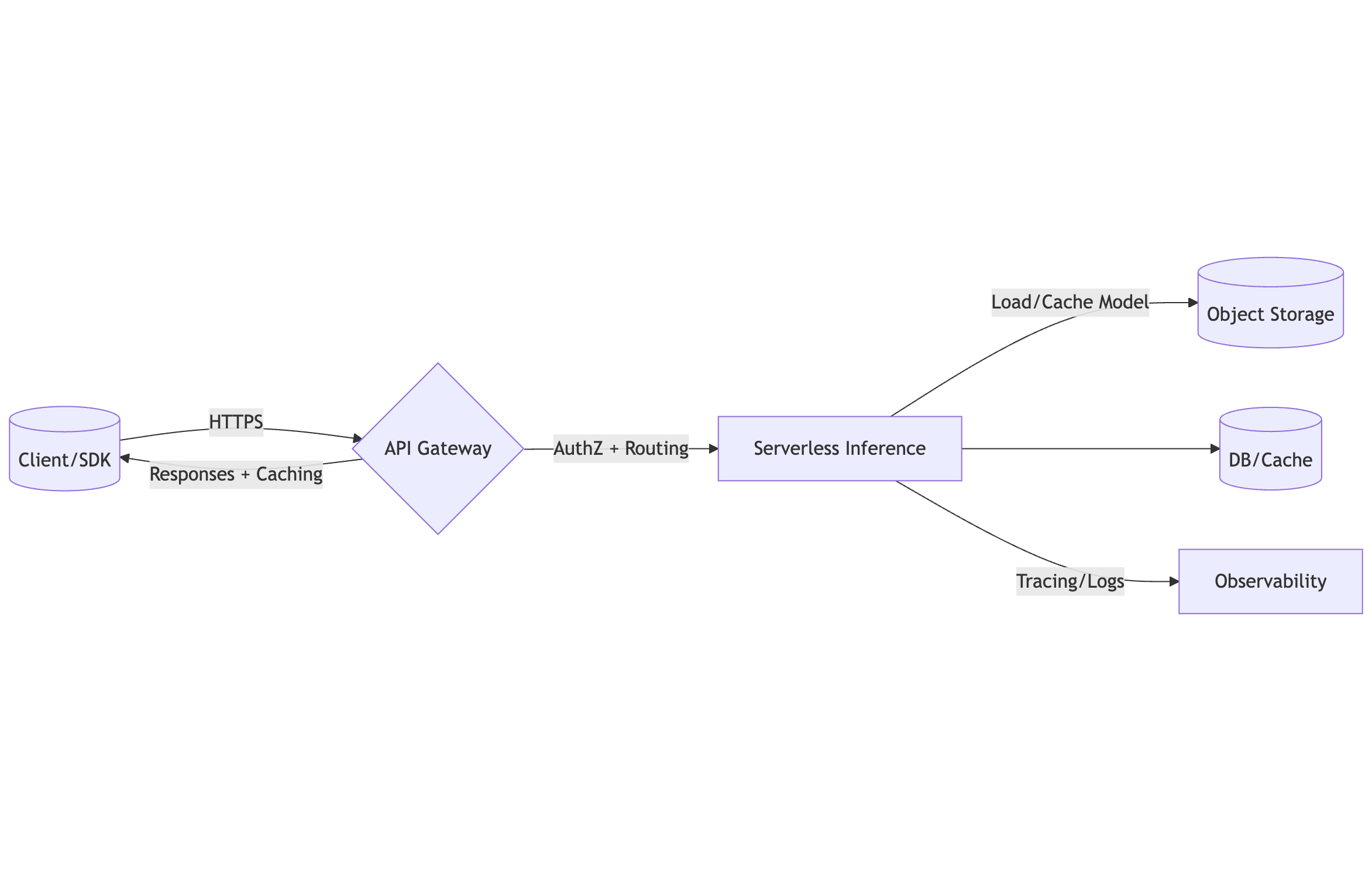
Front your serverless ML inference with managed API gateways.
Architecture
Design decisions you should make first
Endpoint shape:
POST /v1/infer,GET /v1/health,POST /v1/batch.Auth: JWT (OIDC), API keys + usage plans, or mTLS.
Payloads: JSON or binary (base64 for images/audio); max size per gateway.
Timeouts: Keep within gateway & function limits (e.g., 30–60s typical).
Schema: Define OpenAPI (request/response models); return typed errors.
Versioning:
/v1path or header, and staged rollouts (blue/green).CORS: Only allow required origins/headers/methods.
Rate limiting & quotas: Prevent abuse; protect downstreams.
Caching: Enable gateway cache for hot GETs; otherwise cache server-side.
AWS — API Gateway (HTTP API) + Lambda
# Assume you already created Lambda: ml-infer-img
LAMBDA_ARN="arn:aws:lambda:<region>:<acct>:function:ml-infer-img"

# 1) Create HTTP API
API_ID=$(aws apigatewayv2 create-api \
  --name ml-infer-http \
  --protocol-type HTTP \
  --target $LAMBDA_ARN \
  --query 'ApiId' --output text)

# 2) Add route POST /v1/infer (proxy integration already set by --target)
aws apigatewayv2 create-route --api-id $API_ID --route-key "POST /v1/infer" \
  --target "integrations/$(aws apigatewayv2 get-integrations --api-id $API_ID --query 'Items[0].IntegrationId' --output text)"

# 3) CORS
aws apigatewayv2 update-api --api-id $API_ID \
  --cors-configuration '{"AllowOrigins":["https://example.com"],"AllowMethods":["POST","OPTIONS"],"AllowHeaders":["content-type","authorization"],"MaxAge":300}'

# 4) Deploy stage
aws apigatewayv2 create-stage --api-id $API_ID --stage-name prod --auto-deploy

# 5) URL
URL=$(aws apigatewayv2 get-api --api-id $API_ID --query 'ApiEndpoint' --output text)
echo "$URL"
OpenAPI (for REST API or import)
openapi: 3.0.3
info: { title: ml-infer, version: 1.0.0 }
paths:
  /v1/infer:
    post:
      operationId: infer
      requestBody:
        required: true
        content:
          application/json:
            schema:
              type: object
              properties:
                inputs: { type: array, items: { type: array, items: { type: number } } }
      responses:
        '200':
          description: OK
          content:
            application/json:
              schema:
                type: object
                properties:
                  outputs: { type: array, items: { type: array, items: { type: number } } }
Security & throttling
JWT authorizer (Cognito/OIDC) on HTTP API.
API keys + usage plans (use REST API if you need granular plans), or put a WAF before HTTP API.
Rate limits: Configure Stage throttling; Lambda reserved concurrency to protect backend.
Caching: REST API supports native cache; for HTTP API use an upstream cache (CloudFront) or app-level.
Terraform (HTTP API + Lambda + JWT authorizer)
resource "aws_apigatewayv2_api" "api" {
  name          = "ml-infer-http"
  protocol_type = "HTTP"
}

resource "aws_apigatewayv2_integration" "lambda" {
  api_id                 = aws_apigatewayv2_api.api.id
  integration_type       = "AWS_PROXY"
  integration_uri        = aws_lambda_function.fn.arn
  payload_format_version = "2.0"
}

resource "aws_apigatewayv2_route" "infer" {
  api_id    = aws_apigatewayv2_api.api.id
  route_key = "POST /v1/infer"
  target    = "integrations/${aws_apigatewayv2_integration.lambda.id}"
}

resource "aws_apigatewayv2_stage" "prod" {
  api_id      = aws_apigatewayv2_api.api.id
  name        = "prod"
  auto_deploy = true
}
Example request
curl -X POST "$URL/v1/infer" \
  -H 'content-type: application/json' \
  -d '{"inputs":[[1,2,3]]}'
For images/audio, send base64; use binary media types (REST API) or pass through raw bytes with v2 payload and
isBase64Encoded=truefrom the client.
Google Cloud — API Gateway + Cloud Functions (Gen2) or Cloud Run
Google API Gateway is configured using OpenAPI, routing to Cloud Functions/Run via x-google-backend.
OpenAPI (to Cloud Run example)
openapi: 3.0.2
info: { title: ml-infer, version: 1.0.0 }
servers: [{ url: https://ML-INFER-gateway-abcde.uc.gateway.dev }]
paths:
  /v1/infer:
    post:
      security: [{ firebase: [] }]
      x-google-backend:
        address: https://ml-infer-abcdef-uc.a.run.app
        protocol: h2
      responses: { '200': { description: OK } }
components:
  securitySchemes:
    firebase:
      type: oauth2
      x-google-issuer: https://securetoken.google.com/<project-id>
      x-google-audiences: <project-id>
      flows: { implicit: { authorizationUrl: "" , scopes: {} } }
Deploy
# 1) Upload the API config
gcloud api-gateway api-configs create ml-infer-config \
  --api=ml-infer --openapi-spec=openapi.yaml --project=<project> --backend-auth-service-account=<sa>@<project>.iam.gserviceaccount.com

# 2) Create the gateway (regional)
gcloud api-gateway gateways create ml-infer-gw \
  --api=ml-infer --api-config=ml-infer-config --location=<region>

# 3) Get the URL
GURL=$(gcloud api-gateway gateways describe ml-infer-gw --location=<region> --format='value(defaultHostname)')
echo "https://$GURL"
Notes
Auth via Firebase Auth, Google ID, or API keys.
Quotas & monitoring through Service Control.
For heavier models, prefer Cloud Run backend with CPU/RAM tuning and concurrency.
Azure — API Management (APIM) + Azure Functions
Create & import Function app
Create Function App (Premium plan for better cold-starts).
In API Management, Add API → Function App → select your function(s). APIM will create operations mapped to your HTTP triggers.
Common APIM policies (XML)
<policies>
  <inbound>
    <base />
    <cors>
      <allowed-origins>
        <origin>https://example.com</origin>
      </allowed-origins>
      <allowed-methods>
        <method>POST</method>
        <method>OPTIONS</method>
      </allowed-methods>
      <allowed-headers>
        <header>content-type</header>
        <header>authorization</header>
      </allowed-headers>
    </cors>
    <validate-jwt header-name="Authorization" failed-validation-httpcode="401">
      <openid-config url="https://login.microsoftonline.com/<tenant>/v2.0/.well-known/openid-configuration" />
      <audiences>
        <audience>api://ml-infer</audience>
      </audiences>
    </validate-jwt>
    <rate-limit calls="10" renewal-period="1" />
  </inbound>
  <backend>
    <base />
  </backend>
  <outbound>
    <base />
  </outbound>
  <on-error>
    <base />
  </on-error>
</policies>
CLI (skeleton)
# Create APIM instance (can take ~30m)
az apim create -g rg-ml -n apim-ml -l <region> --publisher-email you@example.com --publisher-name You

# Import from Function App
az apim api import --resource-group rg-ml --service-name apim-ml \
  --display-name ml-infer --path ml-infer \
  --api-type http --service-url https://func-ml-infer.azurewebsites.net \
  --specification-format OpenApi --specification-path openapi.json
Caching & products
Enable response caching for GETs.
Use Products with Subscriptions (keys) to group consumers and apply quotas.
CORS (all clouds)
Only allow specific origins (your app domains).
Allow only required headers/methods; preflight cache ~300s.
For binary bodies (images): use
Content-Type: application/octet-streamand ensure gateway pass-through.
Load testing
# Simple k6 example (HTTP JSON)
cat > script.js <<'EOF'
import http from 'k6/http';
import { check, sleep } from 'k6';

export let options = { vus: 10, duration: '1m' };

export default function () {
  const url = __ENV.URL;
  const payload = JSON.stringify({ inputs: [[1,2,3]] });
  const params = { headers: { 'Content-Type': 'application/json' } };
  const res = http.post(url + '/v1/infer', payload, params);
  check(res, { 'status 200': r => r.status === 200 });
  sleep(1);
}
EOF
# run: K6 cloud/local
Cold Start Optimization Strategies
Strategies:
Keep deps slim: choose lighter runtimes (Python/Node), avoid heavyweight ML stacks unless using containers.
Lazy-load models once per instance; cache in global scope and /tmp (or a mounted volume) for reuse.
Prefer container-based functions for heavy deps; use slim/distroless images.
Enable pre-warm features: Provisioned Concurrency (Lambda), min instances (GCF/Cloud Run), Premium plan (Azure Functions).
Quantize/prune models (ONNX/TFLite/OpenVINO) to reduce artifact size and load time.
Set memory higher to increase CPU share during init (often reduces end-to-end latency).
Why Cold Starts Happen
Runtime init → boot language runtime & function host.
Code import → import packages; run top-level code.
Dependency/materialization → load native libs (e.g., BLAS), JIT, compile regex/tokenizers, etc.
Model fetch & load → download from storage, deserialize to RAM.
Network attach → VPC/ENI setup, database connections.
Optimizing any step shortens the first-request latency per instance.
Measure First
Expose and log:
cold_start(module-level flag),model_loaded_ms,import_ms,handler_ms.Track p50/p95/p99 latencies per route & init duration.
Use platform logs/metrics: CloudWatch (Init Duration in REPORT), Cloud Monitoring, App Insights.
Cold-start flag pattern (Python)
import time
COLD = True
START_TS = time.time()

def cold():
    global COLD
    if COLD:
        COLD = False
        return True
    return False
Cross‑Cloud Techniques
1) Packaging & Dependencies
Zip/Layers (Lambda) for tiny stacks; Containers when native libs are large.
Build Linux-compatible wheels ahead of time; avoid runtime
pip install.Use multi-stage Docker builds and distroless/slim bases; minimize layers and files.
Avoid importing heavy libs at module import; lazy import in the handler.
2) Model Artifacts
Store in object storage; download once per instance → cache in
/tmp(Lambda configurable up to ~10GB) or persistent volume (EFS/Azure Files).Use ONNX/TFLite/OpenVINO or TorchScript; quantize (int8/dynamic) & prune to reduce size.
Save in a single file; avoid many tiny files (zip extraction overhead).
3) Compute & Concurrency
Increase memory → more CPU → faster init.
Set concurrency caps to avoid stampedes that spawn many cold instances at once.
For bursty traffic, pair API with a queue (SQS/Pub/Sub/Storage Queue) and a small warm pool.
4) Networking & I/O
If possible, keep functions outside private VPC; if DB access required, use managed proxies (RDS Proxy/Cloud SQL Auth Proxy/Azure SQL connection pooling) to reduce connect overhead.
Reuse HTTP clients and DB pools in global scope.
5) Warm-up & Readiness
Add a /warm or /health?warm=true endpoint that triggers model load.
Use scheduled pings to maintain a minimal warm pool only if platform pre-warm is unavailable.
Code Patterns (Python, ONNX example)
# handler.py
import json, os, time
from storage import fetch_once
import onnxruntime as ort

MODEL_LOCAL = "/tmp/model.onnx"
_session = None
_t0_import = time.time()

# Lazy loader reused across invocations
def get_session():
    global _session
    if _session is None:
        t0 = time.time()
        fetch_once(os.environ["MODEL_URI"], MODEL_LOCAL)
        _session = ort.InferenceSession(MODEL_LOCAL, providers=["CPUExecutionProvider"])
        print({"model_loaded_ms": int((time.time()-t0)*1000)})
    return _session

# Health/warm path
def health(event, ctx):
    _ = get_session()
    return {"statusCode": 200, "body": json.dumps({"ok": True})}

# Inference path
def infer(event, ctx):
    sess = get_session()
    body = json.loads(event.get("body", "{}"))
    x = body.get("inputs", [])
    y = sess.run(None, {sess.get_inputs()[0].name: x})[0]
    return {"statusCode": 200, "body": json.dumps({"outputs": y})}
# storage.py — download once per instance
import os, json, urllib.request

def fetch_once(uri, dest):
    if os.path.exists(dest):
        return dest
    os.makedirs(os.path.dirname(dest), exist_ok=True)
    with urllib.request.urlopen(uri) as r, open(dest, "wb") as f:
        f.write(r.read())
    return dest
Platform‑Specific Playbooks
AWS Lambda
Provisioned Concurrency: keep N instances warm; attach to Alias; autoscale with scheduled or utilization policies.
Ephemeral storage: raise to cache large models in
/tmp.arm64 runtime: faster startup & cheaper for CPU-bound in many cases; validate.
EFS: share large model files across instances; avoid network fetch each time (trade-off: mount latency). Good for artifacts >> 250MB.
VPC: keep functions public if possible; if private, minimize subnets/SG rules and use RDS Proxy.
Container images: base on
public.ecr.aws/lambda/python:<ver>; keep image < 200–300MB compressed.
Google Cloud Functions (Gen2) / Cloud Run
min-instances > 0 for warm pool (costs idle); set max-instances to control bursts.
Prefer Cloud Run for heavier ML; tune memory/CPU, concurrency (e.g., 1–4 for CPU-bound), and startup CPU boost.
Use buildpacks or custom Dockerfiles; keep images slim and region-close to gateway.
Azure Functions
Choose Premium (EP) plan to keep instances pre-warmed (set pre-warmed instance count).
Enable WEBSITE_RUN_FROM_PACKAGE=1 for faster startup.
Use Linux Consumption only for light stacks; prefer Dedicated/Premium for ML.
Cache model in /tmp; for very large artifacts, use Azure Files mounts (trade-offs similar to EFS).
In-short:
| Area | Knob | AWS | GCP | Azure |
| Warm pool | Keep instances warm | Provisioned Concurrency | min-instances (GCF/Run) | Premium pre-warmed instances |
| CPU at init | Memory size | Memory→CPU scaling | CPU allocation per container | Plan SKU (EP1/EP2/EP3) & size |
| Artifact load | Local cache | /tmp up to ~10GB | /tmp | /tmp |
| Heavy deps | Packaging | Container images, Layers | Cloud Run container | Functions on Linux w/ container or dedicated |
| Network | DB access | RDS Proxy, keep-alive | Cloud SQL connectors | Connection pooling/Managed identity |
Anti‑Patterns
Importing TF/PyTorch at module scope when not needed; load lazily.
Runtime installation (
pip install) during cold start.Many tiny files in the package (slow decompression/FS ops).
Oversized images with build tools & caches left in.
Relying solely on cron pings—prefer official pre-warm features.
Validation & SLOs
Define SLOs: p95 cold start < 1200 ms (example) for small models; set realistic targets for heavy models.
Run canary warm-up on deploy; block rollout if
model_loaded_msregresses.Load test with bursty traffic to verify warm pool sizing.
Decision Tree
Model < 50–100MB & light deps? → Zip/Layers, high memory, lazy load.
Heavy deps or native libs? → Container-based function; slim image.
Strict p95 target? → Enable pre-warm (Provisioned/min instances/Premium).
Very large artifacts or shared models? → Use EFS/Azure Files or container with baked-in model (mind image size).
Deployment Checklist
Cold/warm logging and metrics emitted.
Model cached in global scope +
/tmp.Dependencies minimized; image < 300MB (compressed) where possible.
Pre-warm configured (Provisioned/min/Premium) for prod.
Memory tuned for CPU‑bound init; validate arm64/x86.
Gateway/API timeouts ≥ function timeout (and sensible client timeouts).
Concurrency caps set to avoid cold-start stampedes.
Security/IAM least privilege to storage holding models.
Managing Model Storage in S3, GCS & Azure Blob
Recommended Object Layout
models/
  <model-name>/
    versions/
      1.0.0/
        model.onnx           # or .pt/.tflite/.bin
        tokenizer.json       # optional
        manifest.json        # metadata (hashes, io schema)
      1.1.0/
        ...
    current.json             # small pointer → {"version":"1.1.0","sha256":"..."}
Why: immutable version folders + a small pointer (current.json) lets you atomically promote without changing client code.
Example manifest.json
{
  "name": "resnet50",
  "version": "1.1.0",
  "files": [{"path":"model.onnx","sha256":"<...>","size": 104857600}],
  "framework": "onnxruntime",
  "input": {"name":"input","shape":[1,3,224,224],"dtype":"float32"},
  "created_at": "2025-08-10T12:00:00Z"
}
Security (Least Privilege)
Grant your serverless identity read-only to just the model prefix.
Keep buckets private; prefer presigned URLs for external provisioning tools.
Enable at-rest encryption (SSE-S3/KMS, GCS CMEK, Azure CMK) + HTTPS only.
AWS S3 (IAM policy snippet)
{
  "Version": "2012-10-17",
  "Statement": [
    {"Effect":"Allow","Action":["s3:GetObject"],"Resource":["arn:aws:s3:::my-bucket/models/*"]},
    {"Effect":"Allow","Action":["s3:ListBucket"],"Resource":["arn:aws:s3:::my-bucket"],
     "Condition":{"StringLike":{"s3:prefix":["models/*"]}}}
  ]
}
GCS (role suggestion)
- Bind Storage Object Viewer on bucket or prefix-scoped (via uniform bucket-level access + IAM conditions).
Azure Blob (managed identity)
- Assign Storage Blob Data Reader to the function app’s managed identity scoped to the container.
Integrity & Consistency
Verify checksums (SHA-256) against
manifest.jsonon first download.Use ETag/Generation/Content MD5 to skip re-downloads when unchanged.
Store a sidecar file in
/tmpwith last seenetag/generation.
Download & Cache Patterns (Python)
All snippets cache to
/tmp(ephemeral) and reuse across warm invocations. For very large models or many cold starts, consider a persistent mount (AWS EFS, Azure Files, Cloud Run volumes).
Common helper
# cache_utils.py
import json, os, hashlib

META_PATH = "/tmp/model.meta.json"

def sha256_file(path):
    h = hashlib.sha256()
    with open(path, 'rb') as f:
        for chunk in iter(lambda: f.read(1024*1024), b''):
            h.update(chunk)
    return h.hexdigest()

def write_meta(meta):
    os.makedirs(os.path.dirname(META_PATH), exist_ok=True)
    with open(META_PATH, 'w') as f: json.dump(meta, f)

def read_meta():
    try:
        with open(META_PATH) as f: return json.load(f)
    except Exception:
        return {}
AWS S3 (boto3)
import os, json, boto3
from cache_utils import write_meta, read_meta, sha256_file

s3 = boto3.client('s3')
BUCKET = os.environ['MODEL_BUCKET']
KEY_MAN = f"models/{os.environ['MODEL_NAME']}/current.json"
LOCAL = "/tmp/model.onnx"

# 1) Fetch current pointer
cur = json.loads(s3.get_object(Bucket=BUCKET, Key=KEY_MAN)['Body'].read())
version = cur['version']; sha = cur.get('sha256')
KEY_OBJ = f"models/{os.environ['MODEL_NAME']}/versions/{version}/model.onnx"

# 2) Conditional download using ETag
head = s3.head_object(Bucket=BUCKET, Key=KEY_OBJ)
remote_etag = head['ETag'].strip('"')
meta = read_meta()
if meta.get('etag') != remote_etag or not os.path.exists(LOCAL):
    s3.download_file(BUCKET, KEY_OBJ, LOCAL)
    write_meta({"etag": remote_etag, "version": version})

# 3) Optional checksum verify
if sha: assert sha256_file(LOCAL) == sha, "Checksum mismatch"
Google Cloud Storage (google-cloud-storage)
import os, json
from google.cloud import storage
from cache_utils import write_meta, read_meta, sha256_file

client = storage.Client()
bucket = client.bucket(os.environ['MODEL_BUCKET'])
cur_blob = bucket.blob(f"models/{os.environ['MODEL_NAME']}/current.json")
cur = json.loads(cur_blob.download_as_text())
version = cur['version']; sha = cur.get('sha256')
obj = bucket.get_blob(f"models/{os.environ['MODEL_NAME']}/versions/{version}/model.onnx")
local = "/tmp/model.onnx"

meta = read_meta()
if meta.get('generation') != obj.generation or not os.path.exists(local):
    obj.download_to_filename(local)
    write_meta({"generation": obj.generation, "version": version})

if sha: assert sha256_file(local) == sha
Azure Blob (azure-storage-blob)
import os, json
from azure.storage.blob import BlobClient
from cache_utils import write_meta, read_meta, sha256_file

acct_conn = os.environ['AZURE_STORAGE_CONNECTION_STRING']
container = os.environ['MODEL_CONTAINER']
name = os.environ['MODEL_NAME']

cur = BlobClient.from_connection_string(acct_conn, container, f"models/{name}/current.json")
cur = json.loads(cur.download_blob().readall())
version = cur['version']; sha = cur.get('sha256')
obj = BlobClient.from_connection_string(acct_conn, container, f"models/{name}/versions/{version}/model.onnx")
local = "/tmp/model.onnx"

props = obj.get_blob_properties()
remote_etag = props.etag
meta = read_meta()
if meta.get('etag') != remote_etag or not os.path.exists(local):
    with open(local, 'wb') as f: f.write(obj.download_blob().readall())
    write_meta({"etag": remote_etag, "version": version})

if sha: assert sha256_file(local) == sha
Presigned / Signed URLs
Use when your function can’t assume a cloud role or you want time-limited artifact access.
- S3 (boto3):
url = boto3.client('s3').generate_presigned_url('get_object',
    Params={'Bucket': BUCKET, 'Key': KEY_OBJ}, ExpiresIn=900)
- GCS:
url = bucket.blob(KEY_OBJ).generate_signed_url(version="v4", expiration=900)
- Azure Blob SAS:
from azure.storage.blob import generate_blob_sas, BlobSasPermissions
sas = generate_blob_sas(account_name, container, blob_name,
    permission=BlobSasPermissions(read=True), expiry=datetime.utcnow()+timedelta(minutes=15))
url = f"https://{account_name}.blob.core.windows.net/{container}/{blob_name}?{sas}"
Signed URLs are great for build pipelines pushing models to storage or for cross-account read flows.
Performance Tips
Region affinity: put storage in the same region as your compute/gateway.
Content-Encoding: ship compressed artifacts only if your runtime can load them without decompressing to disk repeatedly; otherwise store the raw model.
Single large file > many small files.
Increase Lambda ephemeral storage (e.g., 10240 MB) for big models.
Edge caching: place a CDN (CloudFront/Cloud CDN/Azure CDN) in front of the bucket for faster downloads during cold starts (private origin with origin access identity or signed URLs).
Thundering herd: after deploy, many instances may download at once—mitigate by:
enabling provisioned/min instances and pre-warming,
staggering rollouts,
hosting the model on a CDN with high cache hit ratio,
or using a shared persistent volume (EFS/Azure Files) for very large artifacts.
Lifecycle & Cost Management
Enable versioning; retain last N versions.
Lifecycle rules:
Move old versions to infrequent/nearline after X days.
Expire manifests and training logs sooner; keep current versions in Standard.
Avoid Archive/Glacier for active inference models (high restore latency).
Quick CLI
S3:
aws s3api put-bucket-versioning --bucket my-bucket --versioning-configuration Status=EnabledGCS:
gsutil versioning set on gs://my-bucketAzure: enable versioning and immutability policy at container level as needed.
Promotion Flow (Staging → Prod)
Upload new artifacts to
versions/X.Y.Z/with manifests.Validate checksum and canary tests in staging.
Atomically update
current.json(use object preconditions: if-match etag/generation) to point to the new version.Rollback = update
current.jsonback to previous version.
GCS example (generation guard): set ifGenerationMatch when writing current.json to avoid lost updates.
Caching Headers & CDN
Set
Cache-Control: public, max-age=31536000, immutableon versioned files (safe; content never changes).Set
Cache-Control: no-cacheoncurrent.jsonso clients revalidate pointer.Use signed cookies/headers or OAI (S3) to keep origin private.
S3 vs GCS vs Azure Blob
| Feature | S3 | GCS | Azure Blob |
| Versioning | ✅ | ✅ (Object Versioning) | ✅ |
| Per-object MD5/CRC | ETag (varies) & checksums | CRC32C/MD5 | MD5/ETag |
| Signed URL | ✅ Presigned | ✅ V4 Signed | ✅ SAS |
| KMS/CMEK | ✅ | ✅ | ✅ |
| Object immutability | ✅ (Object Lock) | ✅ (Bucket Lock) | ✅ (Immutability) |
| CDN native | CloudFront | Cloud CDN | Azure CDN |
Serverless Environment Vars
MODEL_STORE   # s3|gcs|azure
MODEL_BUCKET  # or container (azure)
MODEL_NAME    # e.g., resnet50
MODEL_URI     # optional direct URI (s3://, gs://, https://)
Gotchas
S3 ETag is not always MD5 (multi-part uploads) — prefer your own SHA-256 in manifest.
Ensure runtime wheels are compatible with the serverless OS/arch when loading model libs.
Gzip artifacts can add CPU time on cold start; benchmark vs raw.
CDN invalidations: not needed for versioned paths; only for pointer files if you cache them at edge (better:
no-cache).
🔥 Challenges
Deploy a small ML model (e.g., sentiment analysis) to AWS Lambda with API Gateway endpoint.
Store model in S3 and load dynamically during Lambda execution.
Implement batch inference using an S3 upload trigger.
Deploy two models in different serverless functions and route requests based on API parameters.
Provisioned concurrency (AWS Lambda)
Smaller Docker base images for containerized serverless
Implement logging and metrics with CloudWatch + X-Ray (AWS) or equivalent in GCP/Azure.
Test with sample inputs via HTTP request.
🤷🏻 How to Participate?
✅ Complete the tasks and challenges.
✅ Document your progress and key takeaways on GitHub ReadMe, Medium, or Hashnode.
Follow me on LinkedIn
Follow me on GitHub
Keep Learning……


